Product
- Brisque™ 4.0
- Brisque Serve 4.0
Platform
- 44P-170—Hammerhead
- F50—Wildcat (2 and 4 CPUs)
- 6F1—Condor (2, 4, and 6 CPUs
Operating system
IBM® AIX 4.2.1 or IBM AIX 4.3.3
Background
This procedure describes how to connect two DataDirect Networks EF2000 RAID units to a host such as a Brisque 6F1 system.
The DDN DAM works correctly with two EF2000 RAID units. There are no problems foreseen to connect more than two EF2000 RAID units.
Tested
- DataDirect Networks EF2000 RAID—12 x 36 GB
- DataDirect Networks EF2000 RAID—12 x 73 GB
- Two PC1000 FC HBAs to connect the EF2000 RAID units to the host
- Brisque/Brisque Serve F50, 44P, or 6F1 host system
Procedure
Start the DAM application, and select the Device menu.
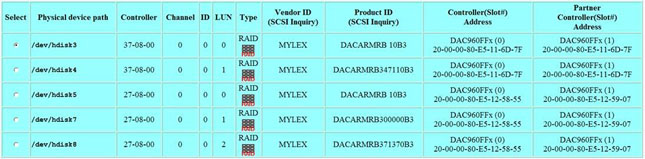
The connection details of the two EF2000 RAID units with the host display
graphically (see image below).
The following steps enable you to check the connection of the EF2000 RAID
units via the AIX command line prompt.
The Controller column displays the first RAID at the address 37-08-00
(see image below).
- In Brisque/Brisque Serve, open a terminal window.
- At the AIX command line prompt, type lsdev –Cspci.
The following output displays:
scsi5 Available 37-08 Cambex Fibre Channel I/O Controller - Type the command lsdev -Ccdisk.
The following output displays:
hdisk3 Available 37-08-00-1,0 EF2000 Fibre Channel RAID
hdisk4 Available 37-08-00-1,1 EF2000 Fibre Channel RAID
The Controller column displays the second RAID at the address 27-08-00 (see image below).
- At the AIX command line prompt, type lsdev –Cspci.
The following output displays:
scsi8 Available 27-08 Cambex Fibre Channel I/O Controller - Type the command lsdev –Ccdisk.
The following output displays:
hdisk5 Available 27-08-00-0,0 EF2000 Fibre Channel RAID

          hdisk7 Available 27-08-00-0,1 EF2000 Fibre Channel RAID

          hdisk8 Available 27-08-00-0,2 EF2000 Fibre Channel RAID
To display the Product ID column information (see image below):
- At the AIX command line prompt, type lsdevfc.
The following output displays:
hdisk3 37-08-00-0,0 EF2000 Fibre Channel RAID

           Manufacturer................MYLEX

          Machine Type and Model......DACARMRB 10B3

          Data capacity in MB.........10.

          hdisk4 37-08-00-0,1 EF2000 Fibre Channel RAID

          Manufacturer................MYLEX

          Machine Type and Model......DACARMRB347110B3

          Data capacity in MB.........347110.

          hdisk5 27-08-00-0,0 EF2000 Fibre Channel RAID

          Manufacturer................MYLEX

          Machine Type and Model......DACARMRB 10B3

          Data capacity in MB.........10.

          hdisk7 27-08-00-0,1 EF2000 Fibre Channel RAID

          Manufacturer................MYLEX

          Machine Type and Model......DACARMRB300000B3

          Data capacity in MB.........300000.

          hdisk8 27-08-00-0,2 EF2000 Fibre Channel RAID

          Manufacturer................MYLEX

          Machine Type and Model......DACARMRB371370B3

          Data capacity in MB.........37137
Images
Technical contact(s)
Content owner: Lev Weissman
See the Escalation page for
escalation contacts.
Date submitted
19 Feb 2003