Dolev 4press - Installation
Set Laser Intensity
Before checking overall exposure quality, the correct laser
intensity for each plotting resolution must be determined.
- Ensure that the Imagesetter control monitor displays a Standby
message.
- On the Imagesetter control panel, press Util. The Utilities screen
will appear.
- Select Exposure. The Exposure options menu appears.
- Select Test Intensity... The Intensity panel will be displayed:
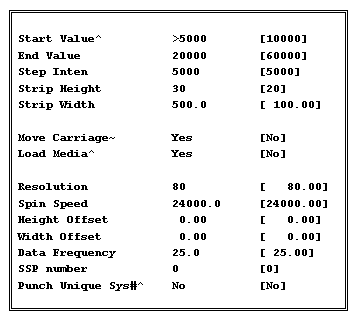
- Fill-in the panel. Use the <Arrow>, <Space> and
<Enter> keys to select from available options.
 Start Value
can range from 700 to a maximum of 40000.
Strip Height setting applies to 26-inch film. Reduce height setting if necessary.
Resolution values can be: 60, 80, 100, 120 , 140 and 160.
Spin Speed should be suitable to the selected Resolution.
- Select Done when you are finished. The Imagesetter will begin
exposing the current set of intensity strips.
- Repeat steps 1 through 6 above to expose a set of strips for each
Resolution: 60, 80, 100, 120, 140, and 160. Ensure that the Spin Speed field is set
correctly for the currently selected Resolution.
Laser intensity must be calibrated and set for each film type and
plotting resolution used, in order to guarantee consistent high-quality exposure.
To determine correct laser intensity, for each set of strips
exposed:
- On a light table, measure the density of the exposed strips. Look for
the darkest strip on the film. This strip will ideally measure:
- 4.2 (for rapid access films); or
- 5.2 (for high contrast films).
The screen associated with the darkest strip must still be smooth,
sharp and of high quality. Write down the intensity appearing next the darkest strip on
the film.
If you cannot
find a strip approximating this density on the film set, then you
will need to adjust overall laser intensity and recreate the strips.
To set the new intensity value, for each set of strips exposed:
- From the Utilities screen, select Exposure. The Exposure options menu
appears.
- Select Res. Int. Setting and choose a setting number (1-6). A setting
panel for that number will be displayed:
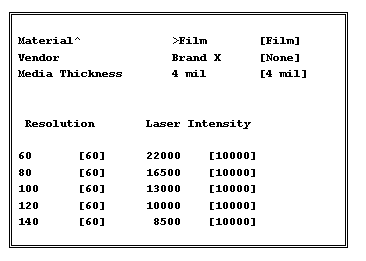
- Fill-in the panel. Enter current film type details and the intensity
setting you recorded for the current resolution.
Use the <Arrow>, <Space> and <Enter> keys to
select from available options. When you are finished, select Done.
Repeat steps 1 through 5 for each plotting resolution and for each
media type, as required. Remember to use a unique Res. Int. Setting number for each unique
media type calibrated.
For additional details on updating the Imagesetter Res/Int table,
refer to Calibration and Service Utilities in the Dolev 4press User Guide. |

