Dolev 4press - Installation
Check Film Loading & Exposure Functions
Loading New Film into the Drum
Load fresh film into the Imagesetter drum. This film will be used to
conduct testts used for building the various Imagesetter exposure tables.
- Reinsert the Loading and Unloading Cassettes into their drawers.
Close both drawers firmly until they click shut.
- Update the Media Information table.
- The Imagesetter will initiate a First Load Cycle. The Imagesetter
control monitor will display a STANDBY message.
Perform Regular Unload
- From the Imagesetter control monitor keyboard, choose Film (F4). The
Film options menu will appear.
- Select Unload. The Imagesetter will perform a regular film unloading
cycle, and the Film Unloading Drawer will open.
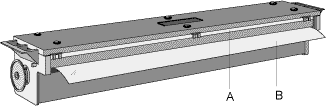
- Remove the Unloading Cassette. Be sure to leave a flap of film
sticking out (B) of the Cassette, as depicted in the following figure.
Removing the Unloading Cassette
Expose test film with the Imagesetter’s internal pattern
generator. These films are used to check Imagesetter plotting accuracy prior to routine
operation.
Attention: Internal Pattern
exposure should be performed only after you have checked and calibrated laser intensity.
- Ensure that the Imagesetter control monitor displays a STANDBY
message.
- On the Imagesetter control panel, press Util. The Utilities screen
will appear.
- Select Exposure. The Exposure options menu appears.
- Select Internal Pattern... The Internal Pattern panel will be
displayed:
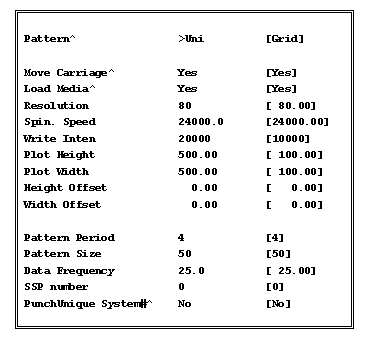
- Fill-in the panel. Use the <Arrow>, <Space> and
<Enter> keys to select from available options.
 Plot Height
setting applies to 26-inch film. Reduce height setting if necessary.
- Select Done when you are finished. The Imagesetter will begin
plotting the selected internal pattern.
- Unload and process the exposed films.
Load Grid from Dskt !
|

