Home | Contact Us | Submit Troubleshooting Info | Search | Help
Output | Software Solutions | Proofing | Color, Screening and Calibration | Scanning | Digital Photography | Consumables | POS
Home | Contact Us | Submit Troubleshooting Info | Search | Help
Output | Software Solutions | Proofing | Color, Screening and Calibration | Scanning | Digital Photography | Consumables | POS
Author/Submitter: A. Posner (01/12/97)
Document Released: 01/12/97
Product Family: Imagesetters / Platesetters
Note:
This article original appeared 11/28/96 (& in version 69.00 of STCL news).
Please replace all paper copies.
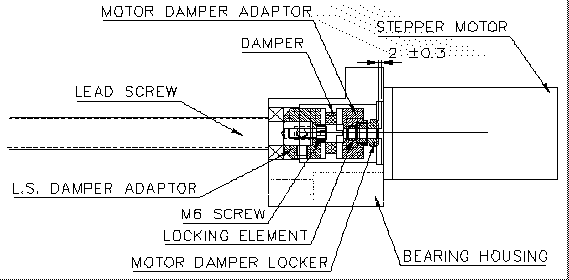
Recently we have been facing problems with the Stepper motor and the carriage. Those problems may be caused the Damper being pressed too tightly between the Stepper and the Leadscrew.
The pressure on the damper should not decrease its size by more than one mm (but there should be pressure on it).
Please follow the enclosed procedure for assembling the
Stepper motor while referring to the following figure: