

Home | Contact Us | Submit Troubleshooting Info | Search | Help
Output | Software Solutions | Proofing | Color, Screening and Calibration | Scanning | Digital Photography | Consumables | POS
Home | Contact Us | Submit Troubleshooting Info | Search | Help
Output | Software Solutions | Proofing | Color, Screening and Calibration | Scanning | Digital Photography | Consumables | POS
Dolev 800/800V/800V² - Brisque Application Issues
Class Screening
Formats & Parameters
User Formats
Overview
Benefits
Conventional Screen
Geometric Dot
Getting Started
Dolev PS - Set Screening Card Type
Using Scitex Class Screening
Setting Screening Parameters
Plotter Formats - Names
Scitex Class Screen Format Names
FullTone - Scitex Class Screen Format Names
Regular Format Names
The new hardware based CreoScitex Class Screening feature is available on Dolev 200, 400 and 800 imagesetters.
This new feature improves screening quality by providing the following:
Accurate and Smooth Dot Shapes: CreoScitex Class Screening precisely calculates dot shape to produce clean and smooth dots with reduced fringe, more smoothly defined edges and a more accurate shape.
Precise Placement of Dots: CreoScitex Class screening enables more precise placement of dots in screen cells.
In addition to the new CreoScitex Class Screen feature, this software version provides a new Geometric Dot, FullTone screening and improvements in the screening function's human interface.
The CreoScitex Class Screen feature is enabled by a new VLSI card with an expansion board. Once tiffs card is installed, you can use either the regular CreoScitex screening functions or the CreoScitex Class Screen functions to expose by setting the required parameters in the used Plotter Format (Class Screen = Yes to activate CreoScitex Class Screening).
Note: The Expose parameters are not the same for the two modules.
CreoScitex Class Screen produces the following screening benefits:
High Definition screening in relatively low resolutions. For instance, 600 LPI (Lines Per Inch) screen ruling at ]40 Resolution.
These benefits and the improvement of Conventional Dot shapes are described in more detail on the following pages.
Conventional Dots
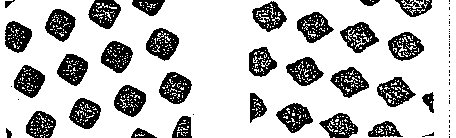
Scitex Class Screen still supports all the conventional] dot shapes (Round, Diamond, Square, Composite and Gravure). All of them have an improved, sharper and crisper appearance.
They all benefit from:
Geometric Dots
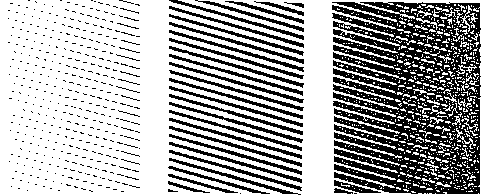
Geometric is a new dot shape that is supplied with this software version. It can be used both with CreoScitex Class Screening (Class Screen = Yes) and with the regular screening (Class Screen = No). Some of the Expose parameters will be different.
The Geometric Dot shape changes according to the area that it covers: highlights, midtones or shadows.
It gradually changes from:
The benefits of using Geometric Dots are:
No rosette patterns on the printed media.
Elimination of a yellow moire effect in red and green areas.
Enhanced details with a sharper, crisper appearance.
High quality- can still be achieved by low mesh values. This makes the Geometric Dot especially suitable for newspapers and magazines.
Important Note: CreoScitex Class Screening can only be applied after you have installed a CreoScitex Class Screen VLSI plug-in card. If you have not purchased and installed this card, do not expose with a Plotter Format in which the Class Screen parameter is set to Yes. If you do, an appropriate message will be displayed.
Perform the following to implement this new CreoScitex Class Screening feature:
Dolev PS - Set Screening Card Type
Scitex Class Screening is implemented with the help of a new VLSI plug-in card. You only need perform the procedure described below if you have installed this card.
Note: The Dolev PS 3.0.5 software release provides many new features and improvements besides the CreoScitex Class Screen function. We highly recommend installing the new VLSI plug-in card. However, it is not mandatory.
Imagesetter Setup Panel
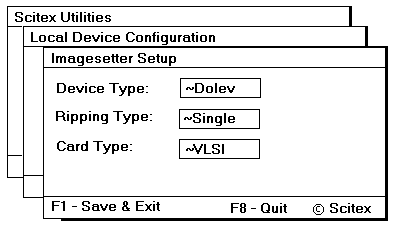
The default value in Card Type is Data. Data represents the following types of cards: New Data 1, New Data 2, Fast Data 1 or Fast Data 2. Therefore, you do not need to perform this procedure if you are working with any one of these cards.
Using CreoScitex Class Screening
Plotter Format - First Panel
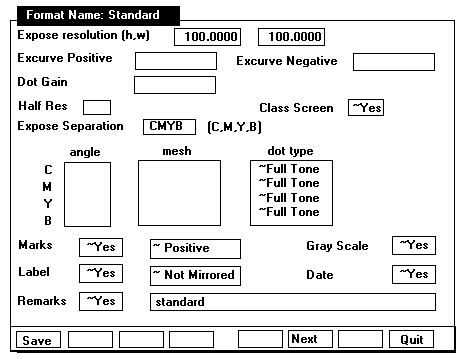
CreoScitex Class Screening is activated via the Plotter Format used during exposure. The first panel of a Plotter Format has a new Class Screen parameter witch can be toggled to Yes to activate CreoScitex Class Screening during exposure.
The dot type of the screen can be toggled to two new options: Geometric and FullTone. These options were described on the previous pages.
FullTone is only available when the Class Screen parameter is set to Yes. The angle and mesh parameters are then inactive.
The Geometric option is available whether Class Screen is active (Yes) or not (No). It provides another dot option for screening.
The User Dot option is unavailable when Class Screen is active.
As in the previous software versions, screening parameters are set in the third panel of a Plotter Format. This panel can be accessed by pressing the Next <F6> function key in the first and second panel of a Plotter Format.
This third panel of a Plotter Format changes according to whether Class Screening is active (Yes) or not (No).
When Class Screen is set to No, the screening parameters panel appears as follows:
Regular Screening - Third Panel
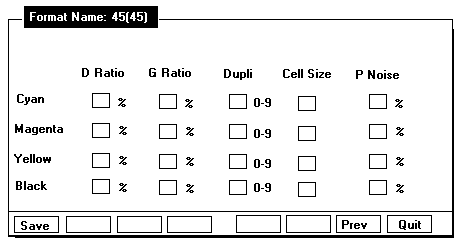
When Class Screen is set to Yes, the screening parameters panel appears as follows:
Plotter Formats - Third Panel
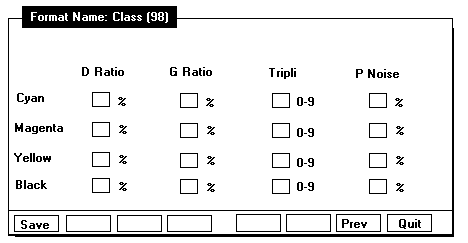
Each panel displays the parameters used for that type of
screening:
D Ratio, G Ratio, Dupli, TripIi and so on.
Not all the parameters (columns) in these panels are available for each dot type:
System Plotter Formats are prepared and supplied by CreoScitex to suit various screening requirements. This section describes the naming conventions of CreoScitex Class Screen Plotter Formats. Plotter Formats that do not include the CreoScitex Class Screen option still follow the existing naming conventions.
The names of System Plotter Formats are comprised of a combination of the following exposure parameters: Angle Set, Mesh (Screen Ruling), Resolution and Dot Type.
There are three different naming conventions for System Plotter Formats:
CreoScitex Class Screen Format Names
This section describes the naming conventions applied to System Plotter Formats which use the CreoScitex Class Screen option and any Dot Type other than FullTone.
| cl | Class Screen: Specifies that the CreoScitex Class Screen option is used in this Plotter Format. |
| x | Angle Set: Represents the Angle
Set. s: Shifted.c: Conventional. n: Conventional with the Yellow separation at 60° and
not at 90° . Mesh: The next digits(s), at least 2 digits and at most 3 digits, represent the screen ruling specified in the Plotter Format. |
| r | Resolution: r stands for expose
resolution. Resolution: The next digits(s), at least 1 digit and at most 3 digits, represent the resolution (p/mm), divided by 10, specified in the Plotter Format. This means that the number specified here is one-tenth the resolution in the Plotter Format. Dot Type:Represents the Dot Type specified in the Plotter Format. c: Composed. g: Gravure. s: Square. m: Geometric. |
For example: cIc60r6c cl: Class Screen Plotter Format.
c: Conventional Angle Set. 60:60 LPI.
6: 60 Resolution (60/10=6).
c: Composed Dot Type.
FullTone - CreoScitex Class Screen Format Names
This section describes the naming conventions applied to System Plotter Formats which use both the CreoScitex Class Screen and FullTone Dot Type options.
| cl | Class Screen: Specifies that the CreoScitex Class Screen option is used in this Plotter Format. |
| r | Resolution: r stands for expose resolution.Resolution: The next digits(s), at least 1 digit and at most 3 digits, represents the resolution (p/mm), divided by 10, specified in the Hotter Format. This means that the number specifed here is one-tenth the resolution in the Plotter Format. |
| full | FullTone: full specifies that a FullTone Dot Type is used in tiffs Plotter Format. |
No Mesh or Angle Set are specified in the name because angle and mesh are not required for FuLlTone screening.
For example: clr6full
This Plotter Format name specifies that a resolution of 60 is used in this Plotter Format.
This section describes the naming conventions applied to Plotter Formats that do not use the CreoScitex Class Screen option. These are the same naming conventions as were used in previous versions.
| x | Angle Set: Represents the Angle
Set. s: Shifted. c: Conventional. n: Conventional with the Yellow separation at 60° and not at 90° . Mesh: The next digits(s), at least 2 digits and at most 3 digits, represent the screen ruling specified in the Plotter Format. |
| r | Resolution: r stands for expose
resolution. Resolution: The next digits(s), at least 1 digit and at most 3 digits, represents the resolution (p/mm), divided by 10, specified in the Plotter Format. This means that the number specified here is one-tenth the resolution in the Plotter Format. |
| x | Dot Type: Represents the Dot Type specified in the Plotter Format.c: Composed.g: Gravure.s: Square.m: Geometric. |
For example: s110r6s
s: Shifted Angle Set.
110: 110 Mesh.
6: 60 Resolution (60/10=6).
s: Square Dot Type.