Home | Contact Us | Submit Troubleshooting Info | Search | Help
Output | Software Solutions | Proofing | Color, Screening and Calibration | Scanning | Digital Photography | Consumables | POS
Home | Contact Us | Submit Troubleshooting Info | Search | Help
Output | Software Solutions | Proofing | Color, Screening and Calibration | Scanning | Digital Photography | Consumables | POS
21-OCT-93
BACKGROUND
The error message "Illegal Stop Spiral" is caused by an intermittent, invalid appearance of a stop spiral condition during an exposure of a line.
This error became valid since the introduction of version 4.
The effect seen on the film is black lines or white lines
around the drum circumference.
This effect (error and film problem) can be caused due to disturbances of the line
voltages, connected to the Dolev 800.
What can cause the effect:
Connection of the on-line processor to the ground of Dolev 800.
Connection of another power consumer element to the ground of Dolev 800.
No grounding connection of the Host to Dolev 800.
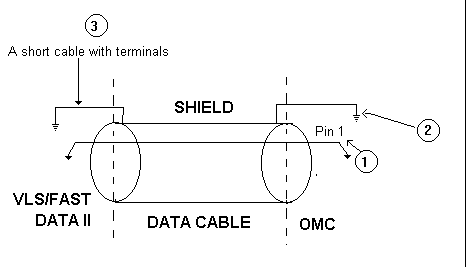
According to a test performed in STCL there is a change in the Dolev cable connecting the Dolev 800 to the I/O station.
In order to implement it it is needed to ground the electrical shielding of the data cable on the side of the I/O station to the I/O station frame.
For proper modification check the following: