Home | Contact Us | Submit Troubleshooting Info | Search | Help


    Output | Software Solutions | Proofing | Color, Screening and Calibration | Scanning | Digital Photography | Consumables | POS


Replacing the TSP high frequency cable for Dolev 800 V3/4


Product

  Dolev 800 V3/4

Background


This procedure describes how to replace the TSP high frequency cable 

  • V3 P/N 199D06226
  • V4 P/N 199D06227

Procedure

 
  1. Perform a total shutdown of the Brisque and the Dolev.
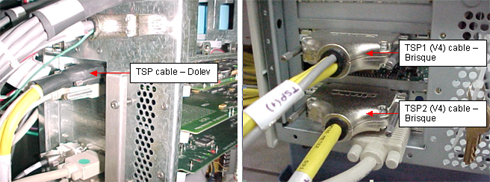
  2. From the SOMC card, disconnect the TSP cable.
  3. From the Brisque, disconnect the TSP cable from the Brisque.
  4. Note: The Dolev 800 V3 TSP cable has one TSP connector and the V4 TSP cable has two TSP connectors, TSP1 and TSP2.

  5. Connect the new TSP cable to the Brisque.
  6. Connect the other side of the new TSP cable to the SOMC card.
  7. Perform the startup procedure.

Images


See also


Dolev 800 V3/V4 Error Messages


Technical contact(s)
 

Content owner: Oded Zaccai
See the Escalation page for escalation contacts.

Date submitted
 

11 Jun 2002


Popups / Tool Tips for this Page

   Close this popup...

  1. Exit the Brisque program, perform a full shutdown, and turn off the Brisque.
  2. Turn off the Dolev and disconnect the main power cable.


Popups / Tool Tips for this Page

   Close this popup...

  1. Connect the main power cable and turn on the Dolev.
  2. Turn on the Brisque and start the Brisque application

    Copyright © 2005 Creo Inc. All rights reserved. Confidential. Back to top.