Home | Contact Us | Submit Troubleshooting Info | Search | Help


    Output | Software Solutions | Proofing | Color, Screening and Calibration | Scanning | Digital Photography | Consumables | POS


Srelay Board - Component Activated by Srelay Board Does Not Work 


Product

 
  • Dolev 800V
  • Dolev 800V3

Component

 
  • Srelay board
  • Component that the Srelay board activates

Symptoms


One of the components activated by the srelay board does not work.


Cause

 
  • Srelay board
  • Wiring or connector
  • Component

Solution

 
  1. Shut down the Dolev application and the machine.
  2. Disconnect the main power cable.
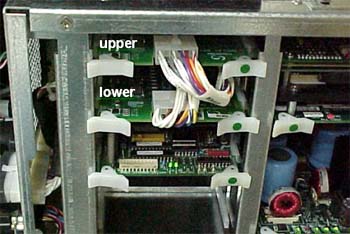
  3. Disconnect all connectors from the upper and lower srelay boards.
  4. Switch the upper srealy board with the lower srelay board.
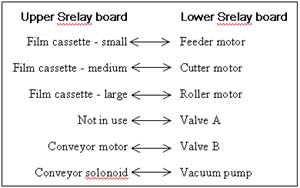
  5. Connect the connector of the component that does not work to the overlapping port on the alternate board, according to the table below.
    For example, if the cutter does not work, connect the cutter motor connector to the medium film cassette port on the upper board.
  6. Reconnect the main power cable.
  7. Start the machine and the Dolev application.
  8. Activate the component that did not work.
    • If the component works, replace the srelay board.
    • If the component does not work, check the wiring and connectors. If the wiring and connectors are intact, replace the component.

Technical contact(s)
 

Oded Zaccai

Submitted by
 

Oded Zaccai

Date submitted
  13 Jan 2003

    Copyright © 2005 Creo Inc. All rights reserved. Confidential. Back to top.