Home | Contact Us | Submit Troubleshooting Info | Search | Help
Output | Software Solutions | Proofing | Color, Screening and Calibration | Scanning | Digital Photography | Consumables | POS
Home | Contact Us | Submit Troubleshooting Info | Search | Help
Output | Software Solutions | Proofing | Color, Screening and Calibration | Scanning | Digital Photography | Consumables | POS
Description Assembling the Conveyor Cover
|
Prepared By: Haim Vaknin & Mario Amir |
FCO Kit No: 510F28117 |
|
Comp. Level: |
Machine S/N: |
|
Catalog No: |
S/W Affected: |
|
Type of Change: CONDITIONAL |
Total Number of Pages: |
|
Product Mgr: Yehuda Solomon |
Approval Date: |
|
Product Support: Haim Vaknin |
Approval Date: 31-Oct-2001 |
|
Customer Support Mgr: Assaf Zach |
Approval Date: |
Reason For Change
When a plate is loaded on the conveyor, it activates the detector. However, when no plate is present, ambient light acts as a plate and activates the detector.
Description of Change
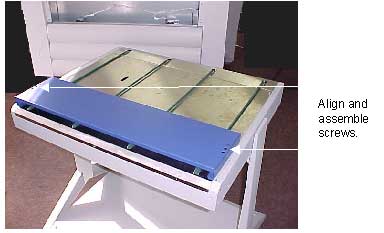
A cover is installed on the conveyor, preventing ambient light from activating the detector.
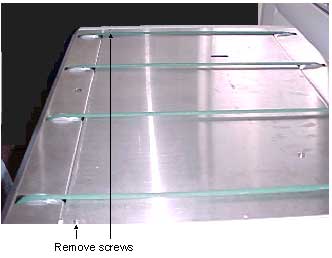
To install the cover:
Parts List
The following parts are included in the FCO kit. (Under the 510F28117)
| PART | DESCRIPTION | QTY |
| Detector Cover | 298B7B392 | 1 |
Attached Documentation
None.
Material Disposition
Dispose of the old parts.
Logistics
|
CSTA |
: |
|
|
CSTE |
: |
|
| CSAP | : | |
|
CSN |
: |
|
|
CSMA |
: |
|
| Other | : | |
| No Limit | : |
| D.U | Month | QTY | Month | QTY | Month | QTY | |
| CSTA | : | ||||||
| CSTE | : | ||||||
| CSTP | : | ||||||
| CSTN | : | ||||||
| CSTMA | : | ||||||
| Other | : |