Home | Contact Us | Submit Troubleshooting Info | Search | Help


    Output | Software Solutions | Proofing | Color, Screening and Calibration | Scanning | Digital Photography | Consumables | POS


FCO 512-01264 and -01264A (for small)- Gripper, Loading and Registration L400

Applies to

  Lotem® 400 platesetters:
  • Lotem 400
  • Lotem 400 (small)
  • Lotem 400 Xpose
  • Lotem 400 Quantum

Priority = Next visit
Release date = 26 Feb 2003

Component


Head Grippers

Problem


During actuation and the opening of the head grippers, the drum moves, due to the mechanical configuration of the head grippers.

Solution

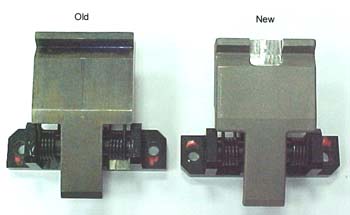
  The grippers were redesigned with slots instead of V grooves, as shown below, to enable the drum to complete its movement before actuation. In addition, the software is being updated to support the slotted grippers and a new loading cycle.
Time needed to implement


1 hour

Parts needed


Part number

Qty

Qty for A

Part Name

500-00335A 5 6 Head Gripper IV assy
380A05081 10 12 SOC HD CAP STST 8x32*5/8
382D10000 10 12 SPRING L/W ST ST #8
719-01264 1 1 FCO document

Procedure


Note: Make sure to use Loctite on all screws

  1. From the PC Controller, open the top door.
  2. Turn off the air pressure.
  3. Shut down the PC Controller and turn off the platesetter.
  4. Disconnect the main power supply.
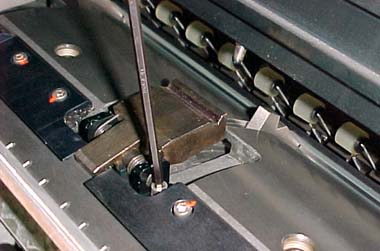
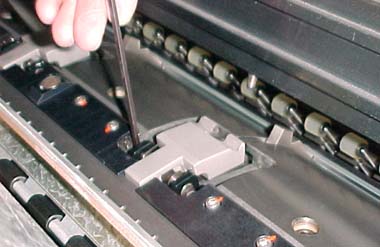
  5. Slightly loosen each of the two screws that secure each head gripper alternately, and then loosen each screw a bit more, until you can remove the head gripper.

Important: Removing one screw without loosening the other at the same rate can cause the head gripper to get stuck in place. This is also true when re-installing the head grippers.

  1. Position each slotted head gripper squarely and evenly on the drum.
  2. Put Loctite® 242 on the two screws that you removed in step 5, and then secure each head grippers by tightening the screws alternately, as described above.
  3. Connect the main power supply.
  4. Turn on the platesetter and start the PC Controller.
  5. Turn on the air pressure.
  6. In the registry, select IO_OBJECTS > Loading System > Loading System Setup, and record the value of the Load head gripper location (mm) parameter.
  7. In Lotem Controller, select Utilities > Hardware > Drum System, and then double-click Drum Motor. The Drum Motor dialog box appears.
  8. Manually activate the load grippers manually, and verify the following:
    • The gripper activates the head gripper
    • In the Drum Motor dialog box, the Position parameter value is exactly the same as the value you recorded in step 11.
  9. Upgrade to version 1.50.08 and install the relevant patches, or upgrade to version 1.60.09.

Patch 4 , specifically for the slotted head grippers, contains four additional registry parameters:

  • Drum to Plate after extra for 0.15 ( 0 )
  • Drum to Plate after extra for 0.2 ( 2 )
  • Drum to Plate after extra for 0.3 ( 3 )
  • Drum to Plate after extra for Small ( 0 )

    Loading system>load plate>load plate extra to drum for 0.15 (or 0.2 / 0.3 / small)

Note: All values are default and ane not relevant to the Lotem 400 with MCU configured.

A parameter was added to the registry that enables you to check if the new head grippers are installed:
Machine > Is Head Gripper V-groove = 0 (indicates that the new head grippers are installed).

Notes:

  • If registration problems persist, reduce the Moment for 0.2 parameter from 45 to 35.
    Loading System>Load Plate>From Drum Entry to Drum Stage>Loading Motor Moment for 0.2 seq
  • If edge detection problems occur after loading Patch 2, change the Machine > Plate on drum absolute position error parameter from 20 to 60.
Logistics
CSC Qty Qty A
CAM 10 10
CEU 15 10
CAP 3 3
CJP 3  
CMA 3  

Test


Load and unload a few plates and verify that the loading sequence progresses smoothly.

Material Disposition


Dispose of the old head grippers.


Technical contact
 

Mario Amir

Product Support Manager: Haim Vaknin

Date submitted
  10 Sep 2003

doc 719-01264
Revision D


    Copyright © 2005 Creo Inc. All rights reserved. Confidential. Back to top.