As of Q2 all Lotem 400 machines are now assembled with TSP and Software
Version 1.10.05
The TSP machines cat number is 501S4L090A.
To upgrade the old machines to TSP Please use the FCO 510F26150
Please send back the VLSI and the SFL board
Abstract:
The kit should includes the following:
Cat
Number
Qnt
Part
name
291A3L803
1
PCI/E30 Bracket
291A7L219
1
PCI 43P BRACKET
374A00080
1
Packing Label-Wht
374A00080
1
Packing Label-Wht
380J01022
2
Phil.Pan Hd.Sst.Sems
4-40x1/4"
380J03024
1
Phil.Pan Hd.Sst.Sems
6-32x1/4"
391S60606
1
Rsc Box 470x380x170
399Z1M292A
1
TSP Installation Guide
503D03465M
1
T.S.P ASSY
504L1L670
1
Cbl,62 Pin D-Type Plg- L=30
504T2D064
1
Flat 100Pin DDB (A+B) to
L-Box
510V1M334
1
CD-PK, BRISQUE V.3.0 OPTIONS
Logistics
Please revert the VLSI Data Box and the SFL board.
Prior to the procedure:
Verify that the distance between the Lotem L-Box and the Brisque isn't
exceeding 30 meters.
The machine should have the DDB-1-N (503D2L695S) C.L. - L or higher and
S/W Version 1.00.06 or higher
(FCO 510F25994)
Verify to have Brisque Update 1.27 or higher.
Procedure
The procedure includes the following steps:
Update the DDB-1-N connections to TSP.
Update the Lotem Application for TSP.
Replace the Lotem - Brisque connection wire.
Installation of the TSP Board (describe in the Brisque installation
guide).
Update the Brisque configuration (update number 1.23 and up).
H/W updating DDB-1-N connections to TSP
Open the Back door and than the left door
Exit from the Lotem Application and shut down the P.C.
Power off the Lotem by the Main Switch.
From the left door open the L-Box to service mode and open it's back door.
Verify DDB1-1-N - sn 503D2L695S is install and the C.L. is L or higher.
Replace DDB to L-Box flat cable "FLAT 100 REC X 2" - sn
504T1L473 with "FLAT 100 PIN DDB (A+B) TO L-BOX"
- sn 504T2D064.
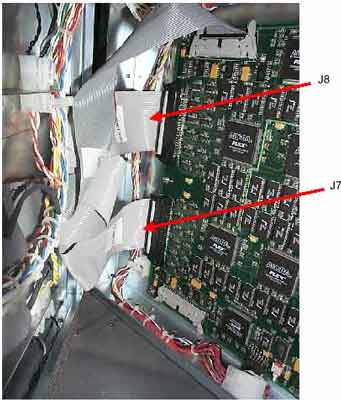
The DDB side of the cable is split for two connectors. Connect both to the
DDB J7and J8 as marked on the cable.
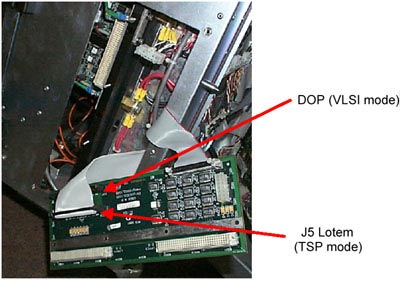
Connect the other side of the cable to connector J5 (marked as Lotem) on
L-Box MB.
Reconnect the cables for the DDB J4, J5, and J9.
Close the L-Box.
Reconnect the cable from the EBOX back to J3 on the DDB (The lower
connector).
Connect the new cable 504L1L670 to the L-Box (The middle connector) and
route it to the Brisque station.
Close the L-Box doors and turn on the L-Box power supply.
Update the Lotem Application for TSP
Software Version 1.00.08
Startup the machine but don't run the Lotem application.
Insert the Lotem Application Version 1.00.08 C.D. (exit from the
auto-installation) and with the Windows Explorer open the folder Ddbinst.
Double click on the file Insttsp.bat this will copy the *.hex
and *.rbf files to the hard drive.
Close all doors and open the Lotem 400 application.
Loading the rbf files to the DDB-1-N flash memory:
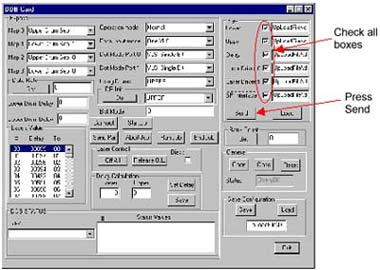
Open the Hardware -->Boards and double click on the DDB.
The DDB window will appear.
Press and check all rbf files boxes (see figure bellow).
Press "Send" button and wait until the sand clock is released
(about 3 minuets).
Shutdown the machine and turn off the main power.
Switch on the machine again and start the Lotem application.
The start up will take about 4 minutes for updating the Altera dips
in the DDB-1-N board according to the new files.
Software Version 1.10.05
Startup the machine but don't run the Lotem application.
On the PC, select Start and then Run from the pop-up menu.
Type regedit in the text box and select OK.
Go to HKEY_LOCAL_MACHINE\SOFTWARE\Scitex\Projects\Lotem400\IO
OBJECTS\DDB CARDS\DDB Card and change the Hex File Name Lotem400\UpLoadFile\Ddb\TSP\ddb-wcs.hex
Go to:
HKEY_LOCAL_MACHINE\SOFTWARE\Scitex\Projects\Lotem400\Machine and change the
Screen Processor Type(VLSI=0 , TSP=1) to "1".
Loading the rbf files to the DDB-1-N flash memory:
Open the Hardware -->Boards and double click on the DDB.
The DDB window will appear.
Note: The window will appear after 2 minutes for updating the Altera dips
in the DDB-1-N board according to the new files.
Click on Send All.
Shutdown the machine and turn off the main power.
Switch on the machine again and start the Lotem application.
Test
Open the Hardware window.
Open the Laser System and click on the Laser Group.The Laser Group
window will appear.
Perform laser calibration to 200 mw and check that all diodes have passed.
Troubleshoot
Problem
Solution
No light calibration
Check that al DDB to MB flat cable connections are as marked
on the cable.
Lotem message error: no. of lines mismatch
(DDB has counted zero lines.)
Check if screen set is in VLSI mode. If it is, change it to
Turbo Screen.
If not, and if TSP has advanced (Brisque's progress
indicator) then check DDB-Plotter cable connection.
DDB has counted mismatch number of lines but not zero.
Check DDB-TSP cable.
Missing end of expose on plate (or middle of expose is
missing)