Home | Contact Us | Submit Troubleshooting Info | Search | Help


    Output | Software Solutions | Proofing | Color, Screening and Calibration | Scanning | Digital Photography | Consumables | POS


Installing Lotem Xpose patch for Lotem 400 Xpose


Product

  Lotem® 400 PSM

Background


The Lotem Expose patch resolves resubmit problems related to an aborted or failed job.


Procedure


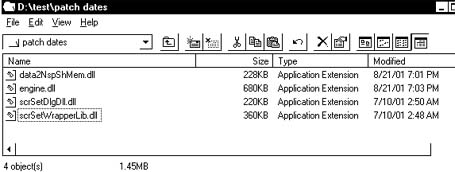
Before installing a patch, check to see if they are already installed as follows:

  1. Browse to C:\LotemExpose\version\dlls.
  2. Check whether the date of the patch is the same as the date of any of the files shown below. If one of the files shown below has the same date as the patch, the patch is already installed.

Installing the Lotem Expose patch from the Lotem Expose CD

  1. Exit the Lotem Expose application.
  2. Insert the Lotem Expose CD.
  3. Browse to the LotemExpose_Extra>Lotem Expose Patches folder, and then double-click the Lotem_Expose_patches.exe file.
  4. Browse to C:\LotemExpose\version\dlls, and then click UnZip.
  5. Click Close.

Installing the Lotem Expose patch from TechPlanet

  1. Click Lotem_Expose_patches.exe to download the Lotem Expose patch.
  2. Copy the patches file to a diskette.
  3. Exit the Lotem expose application.
  4. Insert the disk with the patches in the Lotem PC diskette drive, or copy to the Lotem PC disk via the network.
  5. Browse to the LotemExpose_Extra>Lotem Expose Patches folder, and then double-click the Lotem_Expose_patches.exe file.
  6. Click UnZip.
    Note: The dlls folder is defined as the default path, so you do not have to browse to it.
  7. Click Close.

Technical contact(s)
 

Content owner: Mario Amir
See the Escalation page for escalation contacts.

Date submitted
 

05 Jan 2003


    Copyright © 2005 Creo Inc. All rights reserved. Confidential. Back to top.