Home | Contact Us | Submit Troubleshooting Info | Search | Help


    Output | Software Solutions | Proofing | Color, Screening and Calibration | Scanning | Digital Photography | Consumables | POS


Maintenance for MCU for Lotem 400


Product

 
  • Lotem® 400
  • Lotem 400 Xpose
  • Lotem 400 Quantum
  • MCU for Lotem 400

Background


Perform the maintenance procedures on the following MCU components every 6 months, unless stated otherwise.


Requirements

 
  • Rice paper
  • Alcohol
  • Non-alcoholic press blanket cleaner (rubber rejuvenator)
  • Vacuum cleaner

Maintenance Parts List for Lotem 400 / Lotem 400 Quantum


Procedure


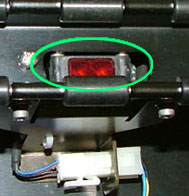
Detectors

Clean the plate on disposal detector with rice paper and alcohol.


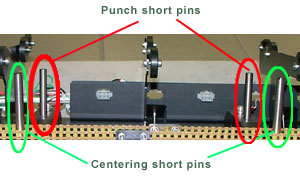
Centering and short pins

Clean the centering and short pins with a cloth dampened with alcohol.


XY rails

Clean and lubricate the X and Y rails with oil, as follows:

  1. From the Controller application, release the MCU from the platesetter and then open the front, top and side doors of the MCU.
  2. Insert motor interlock cheater to enable hardware operation while the door is open.
  3. Select Hardware > Loading System and double-click Loading System.
  4. In the Loading System dialog box, select INIT XY (2).
  5. Remove the motor cheater that you inserted.
  6. Apply a thin layer of lubricant to the left and right X-axis rails.
  7. Reinsert the motor cheater.
  8. Select Hardware > Loading System > Loading Plate to Drum > X System and double-click X Motor.
  9. Send the X motor to position 800, and then send it to HP.
  10. Repeat step 8 to spread the oil evenly on the X axis rails.
  11. Send the X motor to position 500 (parallel to the plate ramp).
  12. Remove the motor cheater.
  13. Apply a thin layer of lubricant to both the left and the right Y-axis rails.
  14. Insert the motor cheater.
  15. Move the X motor to position 450 (suction cups above the plate ramp).
  16. Move the Y motor to position 130, and then to HP.
  17. Repeat step 15 to spread the oil evenly on the Y-axis rail.
  18. In the Loading System dialog box, perform INIT XY (2) (see steps 2 and 3).
  19. Reassemble the MCU doors in reverse sequence.

X and Y belts

Check the tension of the X and Y belts, and adjust if required.

XY bar

Check paralellism.

Suction cups

Check for wear, and replace if required. (See FCO 512-00213A.)

Paper disposal rollers

  1. Remove any pieces of paper that are stuck between the rollers or inside the paper bin.
  2. Use a press blanket cleaner (non-alcoholic) to clean the rollers.

Punch assembly

  1. Clean the punch HP detector with rice paper and alcohol.
  2. Empty the punch slugs from the punch disposal bin.
  3. Use a vacuum cleaner to remove any punch slugs from the interior of the platesetter.

Technical contact(s)
 

Content owner: Mario Amir
See the Escalation page for escalation contacts.

Date submitted
 

06 Feb 2005


    Copyright © 2005 Creo Inc. All rights reserved. Confidential. Back to top.