Home | Contact Us | Submit Troubleshooting Info | Search | Help
Output | Software Solutions | Proofing | Color, Screening and Calibration | Scanning | Digital Photography | Consumables | POS
Home | Contact Us | Submit Troubleshooting Info | Search | Help
Output | Software Solutions | Proofing | Color, Screening and Calibration | Scanning | Digital Photography | Consumables | POS
When changing the type of the Lotem or upgrading the software the Lotem 400 publishes itself in the Brisque differently causing Config problems and changing the file orientation.
The follow is an explanation of the differences and a way to solve it.
| Name in Lotem P.C | The Brisque see the machine as: |
| machine type = Lotem | Lotem 800 |
| machine type = Lotem400 | Lotem 400 |
| After config: | Configuration of: | Lotem_0 |
| Current: | Lotem_0 | |
| Type: | Lotem |
Results:
Expose is OK
During the Edge detection the Focus Motor functions correctly (moves 100 steps
away from the drum when exposing on plates thinner than 0.3 mm).
Results:
During the Edge detection the Focus Motor will not function correctly.
Solution:
Load / upgrade the version to 1.10.05
Do not change the Machine type.
| After config: | Configuration of: | Lotem400_0 |
| Current: | Lotem400_0 | |
| Type: | Lotem400 |
Results:
In the Config dialog the Plate Sets and the Press Formats were read correctly
from the machine, however in the Plate Expose Dialog the plate sets name appears
to be Wrong.
Solution:
If the problem with the Press Format appears and the Configuration of: field
shows: ‘Lotem400_0’ we need to run ConfName script (see Appendix) as many
times as the number of the devices that shows up in the Configuration of: field.
| After running ConfName the Config Dialog shows: | 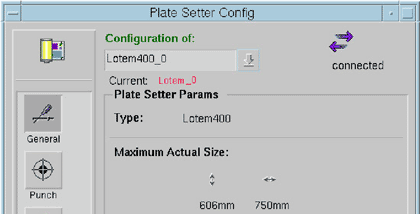 |
|
| Configuration of: | Lotem400_0 | |
| Current: | Lotem_0 | |
| Type: | Lotem400 | |
In the Plate Expose Dialog the plate sets List is correct.
Expose is OK.
Focus Motor functions correctly.
| After config we have: | Configuration of: | Lotem400_0 |
| Current: | Lotem400_0 | |
| Type: | Lotem400 |
Results:
Plate Sets are read Correctly from the PC.
Expose is OK.
Focus Motor functions correctly.
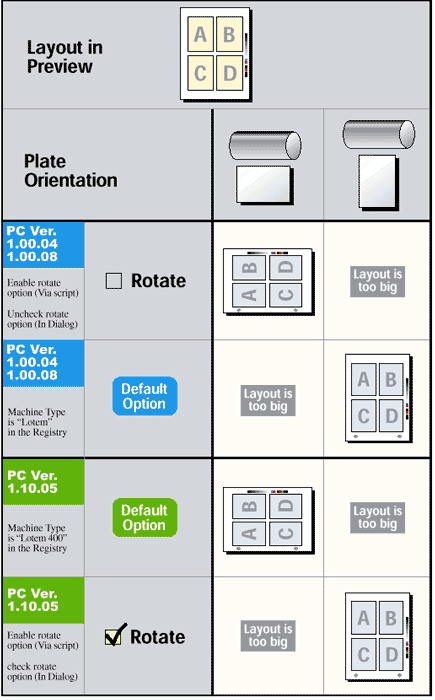
In order to enable/disable the rotate button you have to run the following
scripts.
Adding the Rotate button:
Removing the Rotate button:
ConfName executable patch to correct the identification of the machine type in config
To run the patch you have to open terminal and to type:
# cd /scitex/version/progs <Enter>
# ConfName <Enter>