Lotem 400
From TSP to VLSI with S/W 1.00.06
Yaron Soffer
January 11, 2000
Abstract:
Note: the machine has to have the DDB-1-N board 503D2L695S
Procedure
Updating S/W
- Backup the Registry & Data Base files on a formatted diskette
- Go to the Registry / HKEY_Local_Machine /Software / Scitex /Projects /Lotem
400 and export the registry to the floppy.
- Save the Data Base on a floppy diskette as well.
- Write down the IP address of the PC controller
- Updating to VLSI mode:
- Exit from the Lotem application.
- Insert the Lotem 400 update for 1.00.06 in Drive A:
- Double click on the file Instvlsi.bat
- Open the Lotem 400 application.
- Loading the rbf files:
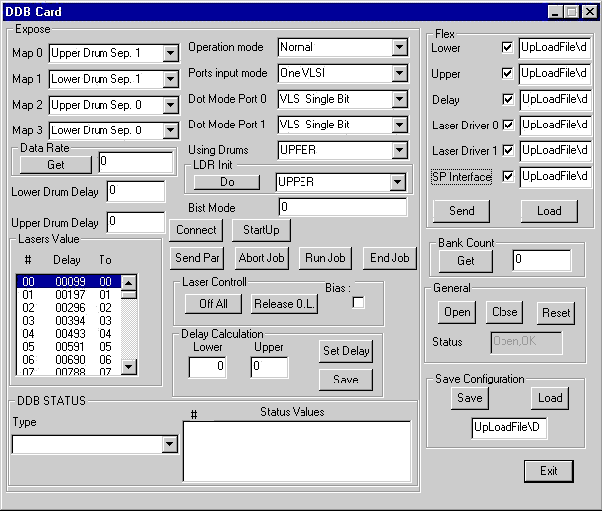
- Open the Hardware ® Boards and
double click on the DDB.
The DDB window will appear.
- Press and check all rbf files boxes.
- Press "Send" button and wait until the sand clock is released.
- Shutdown the machine and turn off the power.
- Switch on the machine again and start the Lotem application.
- Open the Hardware window.
- Open the Laser System and click on the Laser Group.
The Laser Group window will appear.
- Perform laser calibration to 200 mw and check that all diodes have passed.

