Before performing any of the calibration procedures, the following actions should be
taken:
Open the Password for Service Engineer as follows:
Open the Utilities window and select the Users window.
Open the Define User window from this window, in the User Type menu. Select Service
Engineer, and in the Password field, enter AAA.
Open Hardware in the Utilities window. In the Hardware window, open the menu Loading
System, and underneath it Loading System will be displayed again. Double click this line,
and the large Loading System will appear.
In this window click on Init Drum (1), and wait for the action to be completed.
Prior to the procedure:
Ensure the performance of the Init Drum function through Loading System.
Ensure that motor interlock is disconnected. Manually drag the weights from both sides
of the drum up to the mechanical brakes. Connect motor interlock
The weights location on the ruler should be 635mm, 485mm in relation to the
weights’ center
Procedure
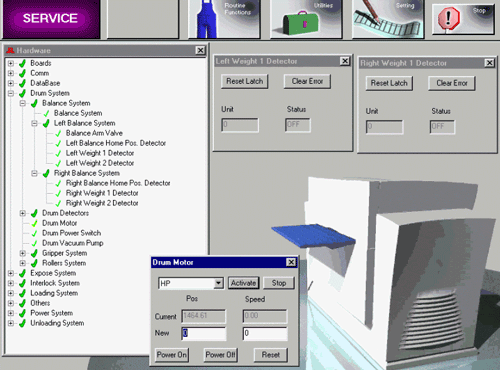
In the Hardware window under Drum System, open the Drum Motor by double clicking on it.
Open in the Hardware window the line Balance System, and underneath it the lines:
Left Balance System.
Right Balance System.
Underneath these lines, double click on the following lines, to open two windows:
Left Weight 1 Detector.
Right Weight 1 Detector.
Physically aim the optical balance detector between the two weights by rotating the
drum, and perform Reset Latch to Left Weight 1 Det and to Right Weight 1 Det. Ensure that
the Status moves to Off.
Rotate the drum in the unloading direction.
Write down on a piece of paper the number in Unit window.
Repeat section 4 three times, and calculate the average value obtained from the results
of both the right side and the left side.
Manually rotate the drum to approximately location 580. Use the Drum Motor window in
Pos.
Manually open the weights actuators and couple the pints to the weights. (When reading
the Pos, ensure that the actuator pins are coupled to the weights).
Write down on a piece of paper the number in the Pos.
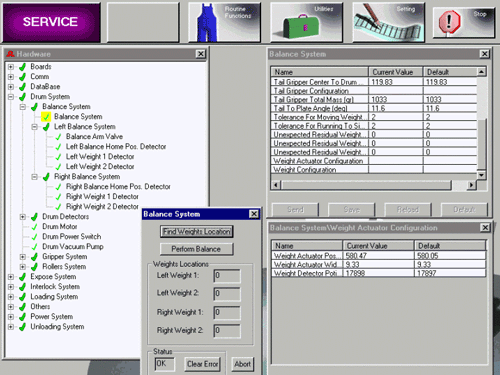
In hardware window under Balance System, the line Balance System appears again. Select
this line and click the right-hand mouse button.
Select the line Weight Actuator Configuration. Double click this line and update the
line Weight Actuator Position (mm) to the value obtained in section 8, and the line Weight
Detector Position to the value obtained in section 5. Perform Save & Send.
Close all the windows apart from Hardware.
Checking the Balance Calibration.
Ensure that motor interlock is connected. Update in the machine the size and thickness
of the plate, which you should know from the location of the balance weights.
Open in Hardware the Balance System and underneath it Balance System will appear again.
Double click this line.
The Balance System window will open. In this window, click on the line Perform Balance.
The machine will adjust the weights for the plate you have updated.
Disconnect motor interlock and check whether the location of the weights is correct
according to the record.
Perform this for a number of plate sizes and thicknesses.
Open windows in Balance System Procedure.
Open Parameter windows in Balance System Procedure.