Home | Contact Us | Submit Troubleshooting Info | Search | Help


    Output | Software Solutions | Proofing | Color, Screening and Calibration | Scanning | Digital Photography | Consumables | POS


Vacuum Checking - Preventive Maintenance


Product

  Lotem® 400 family:
  • Lotem 400
  • Lotem 400 small
  • Lotem 400 w/MCU
  • Lotem 400 w/MCU small
  • Lotem 400 Quantum

Background


Over time, plate ablation accumulates and blocks the drum vacuum holes, causing misregistration and hot spots. Ensure that the vacuum holds the plate firmly to the drum, and thus prevent misregistration and hot spots, by checking the vacuum every 6 months.


Requirements

 
  • Drum Holes Cleaning Kit (P/N 510K1R593)
  • Vacuum gauge by ACCU-AIRE with resolution of 0.02 bar (P/N 344C03012)

Procedure


Before you begin, make sure that the machine has not been working during the last 45 minutes.

  1. Remove any plates from the drum.
  2. Verify that the drum vacuum holes are open, and that the customer cleans them properly by penetrating at least 1" deep with the drill for drum holes (P/N 395A10180).
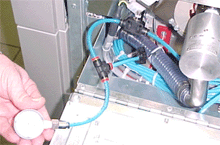
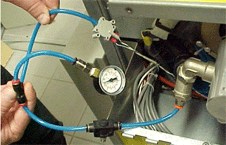
  3. Connect the vacuum gauge tube to the drum vacuum nipple below the swivel joint, as shown below.
  4. Activate the vacuum pump, and verify that the tube is connected correctly and does not leak.
  5. After the pump is activated, wait at least 2 minutes, verify that the dial is vertical and the reading is stable, and then read the vacuum pressure.
  6. If the vacuum pressure is between 0.26 bars and 0.44 bars (7.7"—13" mercury), proceed to step 8.
  7. If the vacuum pressure is not between 0.26 and 0.44 bars, proceed as follows:
  8. Stop the vacuum pump.
  9. Disconnect the vacuum gauge, and then reconnect the vacuum detector tube to the nipple.

Images


Figure 1: Old (left) and new (right) vacuum sensors


Technical contact(s)
 

Content owner: Mario Amir
See the Escalation page for escalation contacts.

Date submitted
 

28 Aug 2002


Popups / Tool Tips for this Page

   Close this popup...   Check for and resolve the following, if required:


Popups / Tool Tips for this Page

   Close this popup...

  1. Pump filter—clean or replace, if required.
  2. Supply voltage—on the Distribution box, on the connector to the pump, measure the supply voltage. If the supply voltage is 208V (phase to phase), replace the pump.

    Copyright © 2005 Creo Inc. All rights reserved. Confidential. Back to top.