Plate length detector procedure for Lotem 400 version 1.30.04
Prior to the procedure:
Before performing any of the calibration procedures, the following
actions should be taken:
Open the password for service engineer as follows:
Select Utilities>Users.
Select User Type>Define User>Service Engineer.
In the Password box, type AAA.
Select Utilities>Hardware>Loading System, and then double-click
Loading System.
Select Init Drum (1), and wait for the action to be completed.
Ensure the performance of the Init Drum function through the Loading System.
Ensure that the motor interlocks are disconnected. Drag the tail gripper
to the end of the track (close to the head gripper), and connect the motor
interlock.
Procedure
Note: This can only be performed if the gripper position
and the attachment of plate to head pins are calibrated.
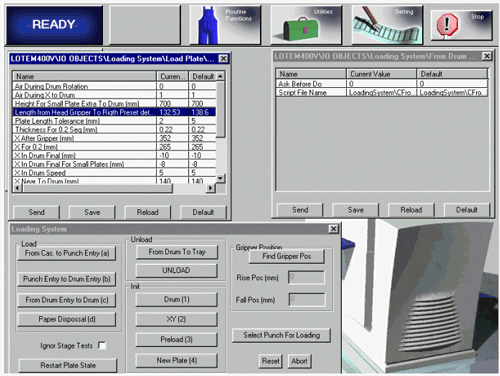
Open the Hardware window. Click on Others. Underneath it will appear Lotem
400. Select this and click on the right-hand mouse button.
Double click on IO Objects. Double click on Loading System, and then double
click on the line Form Drum Entry To Drum Task CNF. In the resulting window,
change the line Ask Before Do from the value “0” to the value “1”, and perform
Save & Send.
In the Loading System window perform Init Drum.
Place a plate with a known length on the loading tray (the plate
length should not exceed 622mm.).
In the Loading System window, click on the line From Drum Entry To Drum
(C). The loading starts to take place in stages.
Click Yes to all the questions until you reach the question Operate Plate
Length Detector.
Click Yes, and afterwards you will be asked Continue?
Click Yes, and the result of the plate length will appear.
Writes down on a piece of paper the results in and click No to all the
next questions.
Remove the plate manually.
Perform Restart Plate State in the Loading System window.
Return the Ask Before Do line from section ý2 to the value “0”, and perform
Save & Send.
Close one window, double click the line Load Plate, and in the resulting
window double click the line From Drum Entry To Drum Stage,
Change the value in the line Length From Head Gripper To Right Preset Det,
according to the formula:
(The value existing in Length From Head Gripper To Right Preset Det) + [(actual
plate length) - (the value copied in section ý7.B)].
Example:
Length From Head Gripper To Right Preset Det = 132.53 + [548.22 - 550] = 130.75
Perform Save & Send. Close all the windows.
Checking the Plate Length Detector.
Repeat all the stages from ý5 to ý9, the value of Length From Head Gripper
To Right Preset Det, should be unchanged, (if you use the same plate you have
calibrated.)
Open Parameter windows in Side to Side System Procedure.
Plate length detector procedure for Lotem 400 (manual) version
1.50.08 and up and Magnus 400
Before loading a plate, change the Plate Length Tolerance (mm) parameter
from 2 (default) to 50.
HKEY_LOCAL_MACHINE\SOFTWARE\Scitex\Projects\LOTEM400V\IO OBJECTS\Loading
System\Load Plate\From Drum entry to Drum Stage
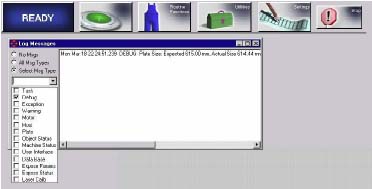
Open the Log dialog box and select Debug.
From the Loading System dialog box, select the plate size to load, and then
load a plate.
In the log, a message appears, indicating the next numbers:
Expect plate size [mm] Actual Plate size [mm] and the differences between
them [error on measurement].
Copy the differences value and add it toLength from Head Gripper to Right
PresetDet (mm) = 132.53 (default).
HKEY_LOCAL_MACHINE\SOFTWARE\Scitex\Projects\LOTEM400V\IO OBJECTS\Loading
System\Load Plate\From Drum entry to Drum Stage
Return the Plate Length Tolerance (mm) parameter to default (2).
To test the accuracy of the plate measurement, load each plate size several
times.
To test and adjust plate measurement accuracy after performing plate length
detector procedure:
Load each plate size several times.
Check the image quality and change the registry parameters, if required.
Load Plate Extra To Drum (default = 17)
Load Plate to Drum Position (default = 96.5)
Important: Perform plate length detection procedure again, and correct if
required.