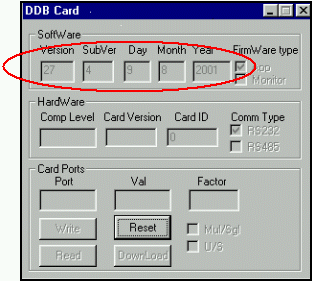
This patch includes new DDB load files (ver. 27 04) for VLSI configuration (ONLY).
This patch solves communications error-operation 'put' of DDB board failed
(OpCode80).
Note: This patch is only for ver 1.30.04
Prerequisites
NUC board comp level N and higher.
DDB-1N board.
Installation Procedure
Note: Before installation make sure that all the applications are closed.
nsert a blank diskette into your computer's floppy drive, and save the attached
file named "Lotem update.exe".
Using the GUI, open the front and right side doors.
Insert the diskette with the saved file into the machine floppy drive.
Close front and right side doors.
Using the explorer, go to drive A and double click on the file.
An automatic Lotem update - installation wizard window will be displayed
on screen, and the new Hex file will be loaded.
After loading the new Hex file a Welcome - Lotem update install
window will be displayed. Press the next button when the loading ended.
Note: The patch will change the Lotem400V\VERSION\Service Pack" to
1
Remove the floppy diskette from drive A and close all the doors.
Start up the application, and make sure the machine is in ready mode.
From the GUI go to Hardware/Boards and double click on the DDB
Card.
It will take a few minutes until the new Hex file will be loaded.
Make sure that after finishing the upload, the machine is in ready mode.
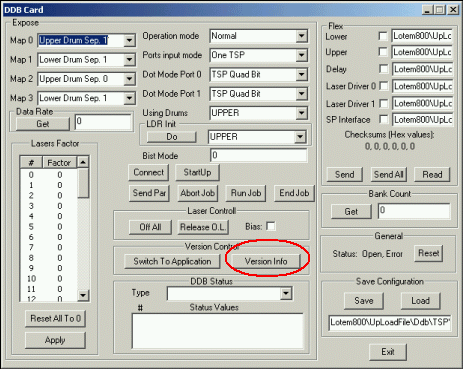
Press the Version Info box in the DDB dialog (see picture no. 1),
and make sure that the existing file is the same as shown in picture no. 2.
Picture no. 1
Picture no. 2
14. Close the DDB Card dialog.
15. Perform laser calibration to check the DDB board.
Test procedure
1. Load a plate.
2. Re-expose the file, which caused communication problems, and make sure the
expose ends with no error messages.