Solution
|
|
- Make sure that the modem is connected to an external, direct line.
If it is not, disconnect the modem, and reconnect it to an external,
direct line. Try to log on to the modem.
- If you cannot log on to the modem with an external, direct line, perform
the test in the Test section, below, to verify that
the modem is functioning properly.
If the test passes and remote connectivity still fails, proceed to step
3.
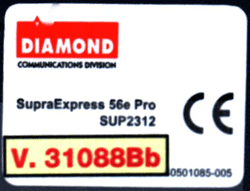
- Check the modem model. The Supra 2312 is now supplied instead of the
previous model, 2311, on the same Creo part number. Look underneath
the modem. If the following sticker appears, your modem is the Supra
2312.
- It is not usually necessary to install the driver or update the modem
(flash), but may be necessary if other steps do not resolve the problem.
- Model 2312:
Uninstall the driver from the C drive, and then reinstall it on the
same drive.
- Model 2311
- Select Start > Programs > Diamond > Modem > Msetup,
and verify that you have configured the country correctly. The instructions
in the Customer Configuration
Setting document explain how to configure the country.
Note: The MSETUP configuration should not be performed on the
Supra 2312.
- Uninstall the driver from the C drive, and then reinstall it
on the same drive.
- Load the flash file. If you have problems loading the flash file
to the modem, replace the modem.
Testing the modem
- Verify the following:
- The cable between the modem connector and the COM2 port in the E-box
is securely connected.
- The modem is securely connected to the power supply.
- The modem is turned on.
- From the Start menu, select
Programs > Accessories > Phone Dialer.
- In the Phone Dialer dialog box, in the Number to Dial box,
type a phone number. (It does not have to be a valid phone number.)
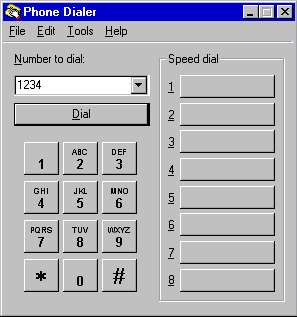
- Click Dial, and wait.
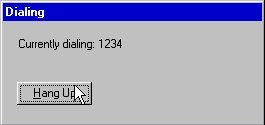
- If the following dialog box appears, the modem is functioning correctly:
Click Hang Up.
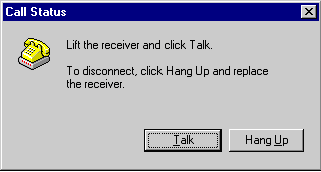
- If the following warning dialog box appears, the modem is not functioning
correctly:
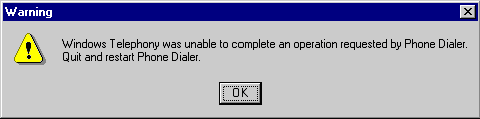
- If the test shows that the modem is not functioning correctly, replace
the modem and repeat the test.
|

