Home | Contact Us | Submit Troubleshooting Info | Search | Help
Output | Software Solutions | Proofing | Color, Screening and Calibration | Scanning | Digital Photography | Consumables | POS
Home | Contact Us | Submit Troubleshooting Info | Search | Help
Output | Software Solutions | Proofing | Color, Screening and Calibration | Scanning | Digital Photography | Consumables | POS
|
|
|||
Product |
Note: This tip applies to manual loading machines, and version 1.50.08. |
||
|
|
|||
Symptoms |
Registration problem on plate |
||
|
|
|||
Cause |
The plate is not firmly pushed against the registration pins due to an incorrect Plate Loading Motor
parameter.
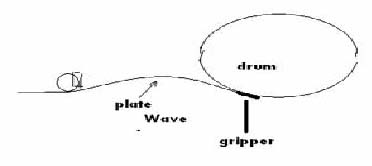
Background The parameters control the completion of the GoPos movement of this DC
motor. This determines if a
"wave" is created between the drum pins and the top of the plate.
This wave acts as a spring that keep the plate secured
against the drum pins.
Many Lotem 400 loading motor "extra" movements (Extra to drum) end by reaching the final position (for example, In Drum Final_mm). Though the drum pins stop the plate movement, the loading motor can keep moving (defined by the relation between the friction and the torque). Normally the motor continues to revolve over the plate. With the current parameter setting, we see two behaviors in the field:
|
||
|
|
|||
Solution |
Change the Set Power Off After Pid Movement parameter from 1 (default) to 0. HKEY_LOCAL_MACHINE\SOFTWARE\Scitex\Projects\LOTEM400V\IO OBJECTS\LOCAL 3\DC MOTORS\Plate Loading Motor\Set Power Off After Pid Movement Two options exist for the Set Power Off After Pid Movement parameter:
Note: This parameter was tested on version 1.50.08, with good results. It has not been tested on version 1.30.04.
|
||
|
|
|||
Technical contact(s) |
|||
Submitted by |
|||
Date submitted |
19 Jan 2002 |
||