Procedure |
|
- To check the head resolution, open the Splot terminal.
- When
Quantum>> appears, press F1.
- When
TH2 > appears, type set sys, and
then check the serial number of the head and the dpi resolution, and
confirm that the head resolution setting is identical to the head resolution
that appears on the head.
- Press f2.
- When
Quantum>> appears, to update the resolution
in TMCE:
- Type
set mode 1 Mscan Resolution 2540 (or 2400)
- Type
set mode 1 Sscan Resolution 2540 (or 2400)
- Type
set mode 1 and confirm that the resolution was updated
in option 1.
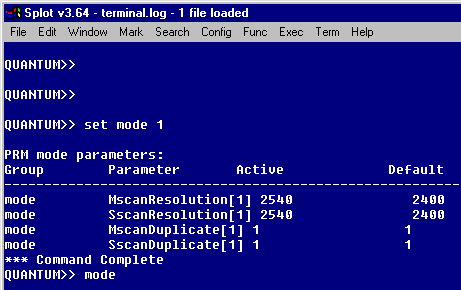
- To update the resolution, type
set mode 2.
- Type
set mode 2 MscanResolution 1270 (or 1200)
- Type
set mode 2 SscanResolution 1270 (or 1200)
- Type
set mode 2 and confirm that the half resolution
was updated in option 2.
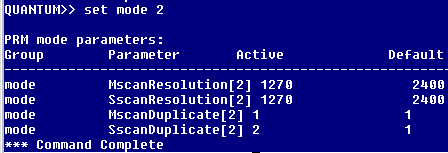
- Type
Set mode 2 sscanduplicate 2 and confirm that the following parameters are set for 2540 dpi (or 2400):
| Group |
Parameters |
Active |
Default |
Units |
| Mode |
MscanResolution[2] |
1270 (or 1200) |
2400 |
DPI |
| Mode |
SscanResolution[2] |
1270 (or 1200) |
2400 |
DPI |
| Mode |
MscanDuplicate[2] |
1 |
1 |
|
| Mode |
SscanDuplicate[2] |
2 |
1 |
|
- In Lotem 400 Quantum Controller, in the hardware tree, select Others
> Lotem400V, right-click Machine, press Ctrl+U
and change the minimum resolution in Min Res to 47 (default is
94.4).
- In Brisque, create a screenset for half resolution:
- In Brisque, click the Plate Expose icon.
- In the Plate Expose dialog box, in the Screen Set area, click
the Format List to build a half resolution screen.
- Click the Devices icon and then select Devices > PlateSetter
> Lotem.
- Click Lotem Quantum and, from the Operations list,
select Screen Set.
- Click New and make the following changes:
- Screenset 1270
- Resolution: 50 dpm
- Comments: halfres 1270
- Angle=Conventional
- Screen Freq: 5.050763 lpm
- Adjust check box: enabled
- Dot shape: Composed
- CMYK:
| |
C |
M |
Y |
K |
| scr.freq |
5.050763 lpm |
5.050763 lpm |
5.0 lpm |
5.050763 lpm |
| D ratio |
80% |
80% |
80% |
80% |
| angle |
105deg |
45deg |
90deg |
-15deg |
- Screenset 1200
- Resolution: 50 dpm
- Comments: halfres 1200
- Angle=Conventional
- Screen Freq: 5.13948 lpm
- Adjust check box: enabled
- Dot shape: Composed
- CMYK:
| |
C |
M |
Y |
K |
| scr.freq |
5.13948 lpm |
5.13948 lpm |
5.249344 lpm |
5.13948 lpm |
| D ratio |
80% |
80% |
80% |
80% |
| angle |
105deg |
45deg |
90deg |
-15deg |
- Click Save.
- Select Reconfig and send a half-resolution exposure.
|

