Home | Contact Us | Submit Troubleshooting Info | Search | Help


    Output | Software Solutions | Proofing | Color, Screening and Calibration | Scanning | Digital Photography | Consumables | POS


Field Change Order #24857 - Paper Disposal Detector

Description

Adding paper detector to indicate paper inside the paper disposal box.

Prepared By: S. Avisror FCO Kit No.: 510F24857
Comp. Level: N/A Machine S/N: Lower Then 9820XXXX
Catalog No. N/A S/W Affected: N/A
Type of Change: Conditional Total Number of Pages:2
Product Mgr: N. Halup Approval Date: 11/16/98
Product Support: S. Avisror Approval Date: 11/16/98
Customer Support Mgr: K. Paperny Approval Date: 11/16/98
  1. Reason For Change - To indicate that there is paper in the paper collection Bin.
    When 50 paper interleaves are connoted in the Bin the operator will receive a warning message that he needs to empty the bin.
    After emptying the collection bin, the paper interleave counter will be reset back to 0.
    When the paper counter reaches 75 the operator must clear the paper Bin, otherwise he cannot continue working on the Lotem.
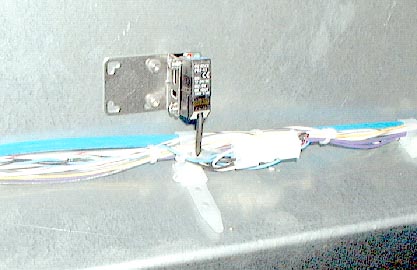
  2. Description of Change - For machines which have a preparation for adding this detector, the change involves assembling a detector to the main frame and then connecting detector to the Molex connectors of the paper detector
  3. Change Procedure -
    1. Assemble the detector between the main bracket and holding plate using the 2 screws supplied in the package. Remember to screw the screws from the main bracket through' the detector to the holding plate which has 2 threaded holes.
    2. Connect the detector assembly to the main frame assembly using the additional 4 screws provided.
    3. Connect the Molex connector to paper out connector.
      fco24857.jpg (27128 bytes)
  4. Test Procedure - Paper Sensor adjustment
    The paper sensor inside the Paper Bin is supported by ver 2 to detect the presence of paper interleaves inside the disposal system
    1. When there is no paper in paper bin the paper presence sensitive screw (remove cassette to access top of sensor) should be rotated till both red and green LED’s (on the sensor) are off.
    2. To test the sensor operation put a paper interleave into the bin, look for a red beam on the sensor, to verify that one of the LED’s (Red) is also ON.
  5. Parts List
    504S1L912 - Paper detector
    380A01040 x 2 - Screws for the detector bracket
    382D04000 x 2 - Springs for the detector bracket
    382A05000 x 2 - Flat Washers for the detector bracket
  6. Attached Documentation
    None
  7. Material Disposition
    None
  8. Logistics
    STA can order up to 9 Kits
    STE can order up to 9 Kits
    STAP can order up to 2 Kits
    STN can order up to 1 Kits
    STMA can order up to 1 Kits

    Copyright © 2005 Creo Inc. All rights reserved. Confidential. Back to top.