Home | Contact Us | Submit Troubleshooting Info | Search | Help


    Output | Software Solutions | Proofing | Color, Screening and Calibration | Scanning | Digital Photography | Consumables | POS


Field Change Order #24994 - Air Filter for the Optic Lens

Sammy Avisror
January 27, 1999
Machine S/N: All
Type of Change: Conditional
S/W Affected: None
Customer Support Mgr: Kuty Paperny

Reason For Change

In order to provide clean and dry air to the optic lens system a new filter has been added to the optic lens.

Description of Change

Add new filter between the air valve (FUFU) and the optic lens system

Change Procedure

  1. Open the right door and the right cover.
  2. Locate the FUFU blue tube coming from the main manifold.  This tube is connected to the right valve on the manifold.
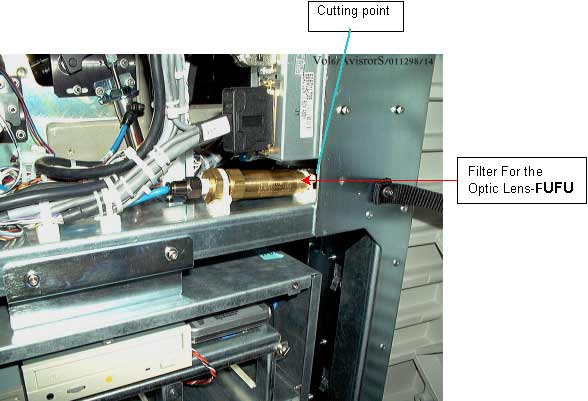
  3. See the position of the filter in the picture.  Cut the blue pressure tube to the correct length so that it can connect to the right nipple of the filter as show in the figure (cutting point).
  4. Remove the tube that remains on the left side of the filter (the tube connected to the manifold).
  5. Connect the tube from the FCO kit (1 meter blue tube).  Leave about 70 cm and connect the tube to the left nipple on the filter and to the FUFU valve on the manifold.
  6. Connect two cable ties to secure the filter.
  7. Place two tie mounts under the filter, attach with cable ties as shown in the picture.
  8. The filter for the optic lens (FUFU) needs to be replaced every year.  Filter P/N - 342A10305.

24994a.jpg (32774 bytes)

Test Procedure

Check that there is no leakage air from the filter.

Parts List

344B81003 NIPPLE
344B81000 NIPPLE
342A10300 Air Filter
344F10131 BLUE TUBE 1 METER
203B10030 CABLE TIE X 2
342A10305 OPTIC LENS FILTER

Attached Documentation

None

Material Disposition

None


    Copyright © 2005 Creo Inc. All rights reserved. Confidential. Back to top.