

Home | Contact Us | Submit Troubleshooting Info | Search | Help
Output | Software Solutions | Proofing | Color, Screening and Calibration | Scanning | Digital Photography | Consumables | POS
Home | Contact Us | Submit Troubleshooting Info | Search | Help
Output | Software Solutions | Proofing | Color, Screening and Calibration | Scanning | Digital Photography | Consumables | POS
Description The purpose of this FCO is to improve the performance of the DC motor by connecting an adaptor cable to reduce the noise entering the encoders.
|
Prepared By: Itai Peperovich |
FCO Kit No: 510F28061 |
|
Comp. Level: |
Machine S/N: |
|
Catalog No: 506D1L736 |
S/W Affected: |
|
Type of Change: Mandatory |
Total Number of Pages: 3 |
|
Product Mgr: Nir Halup |
Approval Date: 22-Nov-2001 |
|
Product Support: Itai Peperovich |
Approval Date: 14-Nov-2001 |
|
Customer Support Mgr: Assaf Zach |
Approval Date: |
1. Reason For Change
The noise entering the motor encoders causes the motor to lose location, and eventually causes loading problems. In order to verify that this phenomenon exists, run the script attached below before connecting the cable adaptors.

2. Description of Change
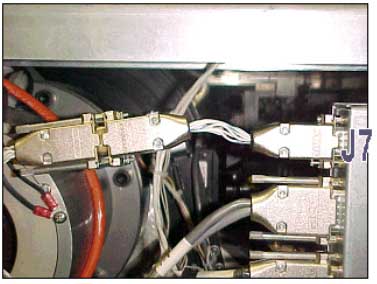
Connecting two adaptor cables to connector J7 on the Local2 boards,
to Improve the grounding of the 24v supply to the local boards. One side affect
of this problem was "noise" on the encoder lines that cause the X
& Y motor problems.
3. Change Procedure
3.1. Open the front and right doors.
3.2. Insert cheaters to defeat the motor interlocks system.
3.3. Insert a floppy diskette with the saved script file in the floppy drive.
3.4. From the GUI, select Utilities and then click Execute Script.
(You must be in expert mode CTRL + U).
3.5. Click the … button in the dialog window to choose the file location,
as shown below.
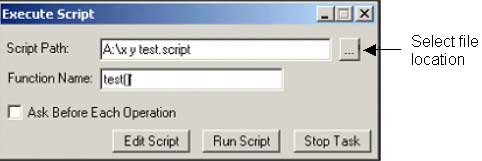
3.6. Select the floppy drive and double-click on the xy script file. The file
name appears in the Script Path box.
3.7. In the Function Name box, type test() and click the Run
Script button. The script runs the XY system forward and backward 200 cycles.
3.8. Check X- and Y-motor positions:
· After five or six cycles, if you can see that the X- and/or Y-motor position is not the same as the previous position, stop running the script immediately before the X/Y hits mechanical parts. Proceed to step 3.9.
· If the X- and/or Y-motors are in the same position, wait until the script ends.
3.9. Close the application and shut down the machine.
3.10. Remove the left and right plastic laser covers.
3.11. Disconnect the left and right cables connected to J7 from the Local2
boards.
3.12. Connect the adaptor cable to J7.
3.13. Reconnect the cables to the adaptor .
4. Test Procedure
4.1. Power up the machine and start the application.
4.2. Run the script again and make sure that the problem does not occur.
4.3. Close the plastic laser covers.
4.4. Close all doors.
4.5. Make sure that the machine is in ready mode.
4.6. Load plates of different sizes and check the image parallelism.
5. Parts List
| PART | QTY | DESCRIPTION |
| 374A00080 | 1 | PACKING LABEL-WHT |
| 504L3E909 | 2 | ADAPTOR TO J7 LOCAL-2 |
|
7!FCO-DOC |
1 | FCO DOCUMENT |
6. Attached Documentation
None.
7. Material Disposition
Return all units to Creo Israel, so we can check them.
8. Logistics
8.1 Approved quantities:
|
CSA |
: |
90 |
|
CSE |
: |
90 |
|
CSAP |
: |
30 |
|
CSN |
: |
30 |
|
CSMA |
: |
5 |
| Other | : | |
| No Limit | : |
8.2 Schedule supplies for first lots:
|
D.U |
Month |
QTY |
Month |
QTY |
Month |
QTY |
|
|
CSA |
: |
December | 30 | January | 30 | February | 30 |
|
CSE |
: |
December | 30 | January | 30 | February | 30 |
|
CSAP |
: |
December | 10 | January | 10 | February | 10 |
|
CSN |
: |
December | 10 | January | 10 | February | 10 |
|
CSMA |
: |
December | 10 | January | 10 | February | 10 |
|
Other |
: |
8.3. Inventory in warehouses:
Old punch shortcut base assembly P/N: 507A4L164 must be sent back to CSIL.