Home | Contact Us | Submit Troubleshooting Info | Search | Help
Output | Software Solutions | Proofing | Color, Screening and Calibration | Scanning | Digital Photography | Consumables | POS
Home | Contact Us | Submit Troubleshooting Info | Search | Help
Output | Software Solutions | Proofing | Color, Screening and Calibration | Scanning | Digital Photography | Consumables | POS
Applies to |
|
Priority: Next visit |
|||||||||||||||||||||||||||||||||||||||||||||||||||||||||||||||||||||||||||
Component |
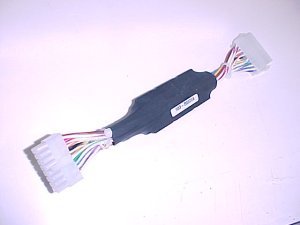
Power failure protector board assembly |
||||||||||||||||||||||||||||||||||||||||||||||||||||||||||||||||||||||||||||
Problem |
When an electrical power interruption ocurrs, the platesetter turns off and then on again, according to the behavior of the power lines. An electrical power surge can cause machine components to explode or burn. |
||||||||||||||||||||||||||||||||||||||||||||||||||||||||||||||||||||||||||||
Solution |
Add a power failure protector board to maintain the platesetter in an off status until the On/Off push button is toggled. |
||||||||||||||||||||||||||||||||||||||||||||||||||||||||||||||||||||||||||||
Time needed to implement |
20 minutes |
||||||||||||||||||||||||||||||||||||||||||||||||||||||||||||||||||||||||||||
Parts needed |
|
||||||||||||||||||||||||||||||||||||||||||||||||||||||||||||||||||||||||||||
Procedure |
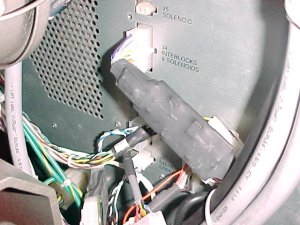
Power Failure Protector Board Installation
Testing the Power Fail Protector Board Installation
|
||||||||||||||||||||||||||||||||||||||||||||||||||||||||||||||||||||||||||||
Logistics |
Approved quantities:
Schedule supplies for first lots:
Inventory:
Lead Time: 2 months | ||||||||||||||||||||||||||||||||||||||||||||||||||||||||||||||||||||||||||||
Technical contact |
Product Support Manager:Yaron Soffer |
||||||||||||||||||||||||||||||||||||||||||||||||||||||||||||||||||||||||||||
Date submitted |
04 Dec 2003
719-03310A Rev A |
||||||||||||||||||||||||||||||||||||||||||||||||||||||||||||||||||||||||||||