Home | Contact Us | Submit Troubleshooting Info | Search | Help
Output | Software Solutions | Proofing | Color, Screening and Calibration | Scanning | Digital Photography | Consumables | POS
Home | Contact Us | Submit Troubleshooting Info | Search | Help
Output | Software Solutions | Proofing | Color, Screening and Calibration | Scanning | Digital Photography | Consumables | POS
Applies to |
|
Priority: Next visit |
|||||||||||||||||||||||||||||||||||||||||
Machines affected |
Platesetters containing Local3 boards |
||||||||||||||||||||||||||||||||||||||||||
Component |
Local3 boards |
||||||||||||||||||||||||||||||||||||||||||
Problem |
Two conflicting components within the platesetter cause Local3 board error messages to appear:
These components may also cause valve and/or gripper error messages to appear. |
||||||||||||||||||||||||||||||||||||||||||
Solution |
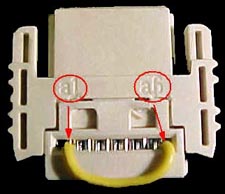
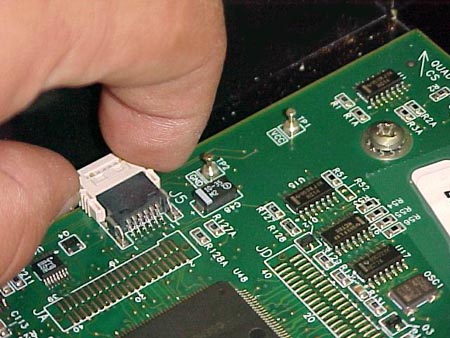
Connect a closed circuit connector to each of the Local3 boards. Important: This FCO contains three connectors per each Local3 board. Store any unused connectors in your tool box. |
||||||||||||||||||||||||||||||||||||||||||
Time needed to implement |
15 min. |
||||||||||||||||||||||||||||||||||||||||||
Parts needed |
|
||||||||||||||||||||||||||||||||||||||||||
Procedure |
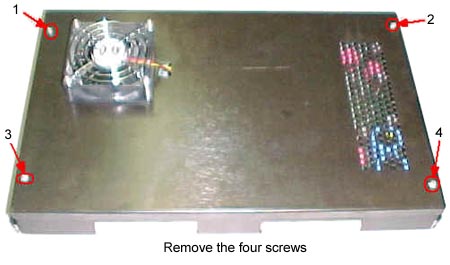
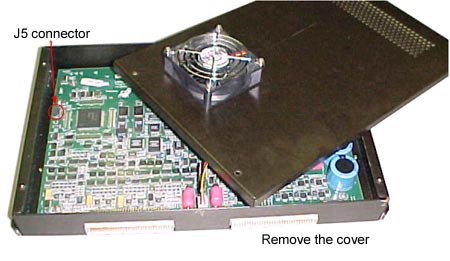
|
||||||||||||||||||||||||||||||||||||||||||
When done |
Restart the platesetter. Check that the error message |
||||||||||||||||||||||||||||||||||||||||||
Logistics |
Approved quantities:
Schedule supplies for first lots:
Lead Time: Allow five weeks for extra quantities |
||||||||||||||||||||||||||||||||||||||||||
|
|
|||||||||||||||||||||||||||||||||||||||||||
Technical contact |
|
||||||||||||||||||||||||||||||||||||||||||
Date submitted |
04 Nov 2003 | ||||||||||||||||||||||||||||||||||||||||||
doc 719-02139A Rev A