

Home | Contact Us | Submit Troubleshooting Info | Search | Help
Output | Software Solutions | Proofing | Color, Screening and Calibration | Scanning | Digital Photography | Consumables | POS
Home | Contact Us | Submit Troubleshooting Info | Search | Help
Output | Software Solutions | Proofing | Color, Screening and Calibration | Scanning | Digital Photography | Consumables | POS
| Lotem 800 Installation Guide Lotem 800 ATP |
The Registration target for the Lotem 800 is shown in the following figure. This target checks the exposure registration for each of the four separations. The exposure of the Registration target should be performed without unloading the plate between the separations.
The Registration target consists of a special pattern of the cyan, magenta, yellow and black separations. This pattern is designed so that there are several areas where the lines of one separation penetrate between the lines of another separation. This enables to measure the distances between the lines at the areas of penetration. In perfect registration, the distances are equal.
To check the registration:
Note: If the distances are not equal, the deviation should not exceed 50 µm.
Figure 6-4 on next page shows the ATP Registration target.
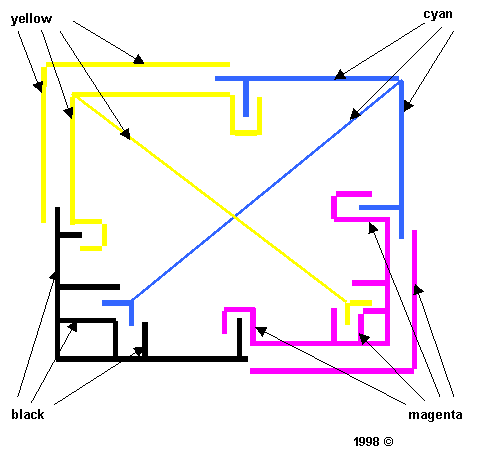
Figure 6-4: ATP Registration target
Copyright (c)1998 Scitex Corporation Ltd. All rights reserved. Certain names, logos, designs, titles, words or phrases on this page may constitute trademarks, servicemarks, or tradenames of CreoScitex Corporation Ltd. or other entities which may be registered in certain jurisdictions.
Top of Page Previous Page ToC Next Page