

Home | Contact Us | Submit Troubleshooting Info | Search | Help
Output | Software Solutions | Proofing | Color, Screening and Calibration | Scanning | Digital Photography | Consumables | POS
Home | Contact Us | Submit Troubleshooting Info | Search | Help
Output | Software Solutions | Proofing | Color, Screening and Calibration | Scanning | Digital Photography | Consumables | POS
Check that +5.1Volts provided by the Power supply in the E-box reaches the MCF board. This is the last board in the wiring sequence to receive power from the power supply. If it receives the correct voltage then all other boards before it receive the same power. Of course, all the boards must be securely connected.
The Power supply (5.1V) is located at bottom of E-Box.
|
Open the right door of the machine Open the E-Box cover. |
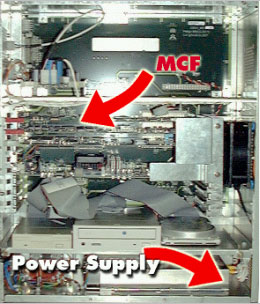 |
| Examine whether MCF board is Revision A or C. | 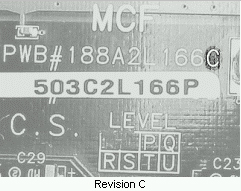 |
|
If MCF is revision A, connect DVM leads to the ground and VCC terminals. If MCF is revision C, connect DVM leads to the ground and TP1 terminals. |
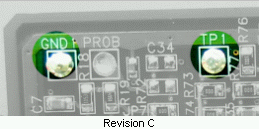 |
| Measure the voltage. It should be 5.1 |
+ 5.1 Volts
|
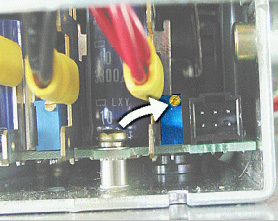
| If the voltage is incorrect, you must adjust a small potentiometer at
the right bottom side of the E-box.
Use a long thin screwdriver to reach the potentiometer. On an older E box, you need to insert the screwdriver through the closest ventilating hole in the chassis. On a newer E box, there is a small cover on the chassis that can be opened with a Phillips screwdriver. |
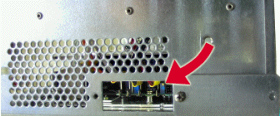 Newer E boxRight bottom side |
|
Turn the right blue potentiometer until the reading on the voltage meter shows 5.1 volts. Do not exceed this voltage. |
 |