

Home | Contact Us | Submit Troubleshooting Info | Search | Help
Output | Software Solutions | Proofing | Color, Screening and Calibration | Scanning | Digital Photography | Consumables | POS
Home | Contact Us | Submit Troubleshooting Info | Search | Help
Output | Software Solutions | Proofing | Color, Screening and Calibration | Scanning | Digital Photography | Consumables | POS
The reasons to perform this procedure are
Open the new unit of light Detector and see the factor that is writing on the left side of the unit.
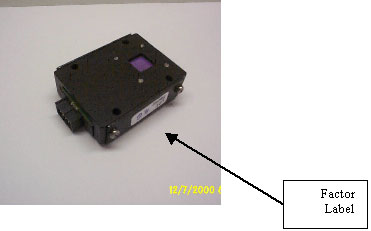
Enter the parameter to the registry under:
Hardware / Laser group/ High DAC Fact.
Hardware / Laser group/ Low DAC Fact.
You need to update both of them with the same parameter.
Send the carriage to position 500.
Open the top rear door and the right door.
Shut down the machine.
Disassemble the rear panel and the unloading tray.
Disassemble the light Detector unit and the connector.
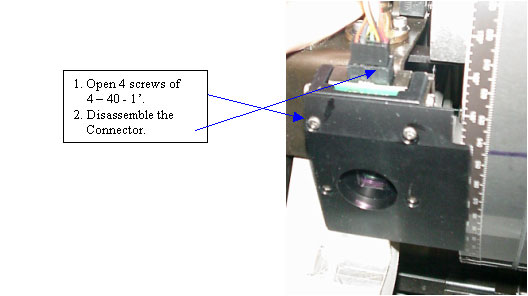
Assemble the new unit, the light detector should be perpendicular to the drum.
Assemble
all the components back, remember to put
back the bracket that hold the light
detector and the balance arm assembly
to the main frame.
Turn on the machine.
Perform laser calibration at 300 mw and check that it works fine.
Expose Final ATP file, and check uniformity.