Home | Contact Us | Submit Troubleshooting Info | Search | Help


    Output | Software Solutions | Proofing | Color, Screening and Calibration | Scanning | Digital Photography | Consumables | POS


Aligning the DLC’s upper and lower centering arms


Product

 
  • Lotem® 800
  • Lotem 800 II
  • Lotem Quantum
  • Lotem Quantum Spectrum

Background


The upper and lower centering arms on the DLC (dual loading cassette) should be aligned with each other and centered on their respective trays.


Requirements


Centering arm alignment jig (part number 690-00189A)


Procedure

 
  1. Insert the DLC into the Lotem platesetter.
  2. Make sure the centering arms on the lower tray are centered.
  3. Release the DLC from the Lotem.
  4. Remove the plates from the upper and lower trays.
  5. Slide down the upper cassette tray without actually locking it.
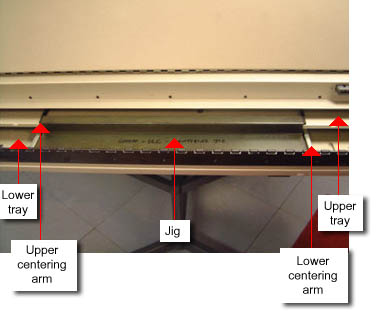
  6. Place the centering arm alignment jig (p/n 690-00189A) on the lower tray. Use the centering arms to center the jig:


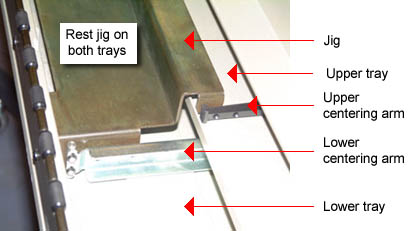
  7. Rest the centering alignment jig on the upper tray. If required, center the upper centering arms:


  8. Remove the jig.

Test

 
  1. Load a plate from the lower tray. Check that the Lotem centering pins correctly center the plate.
  2. Load a plate from the upper tray. Check that the Lotem centering pins correctly center the plate.
  3. Expose a test file from both the upper and lower trays. Make sure the image is centered on the plate.

Technical contact(s)
 

Content owner: Moshe Arviv
See the Escalation page for escalation contacts.

Date submitted
 

20 Apr 2004


    Copyright © 2005 Creo Inc. All rights reserved. Confidential. Back to top.