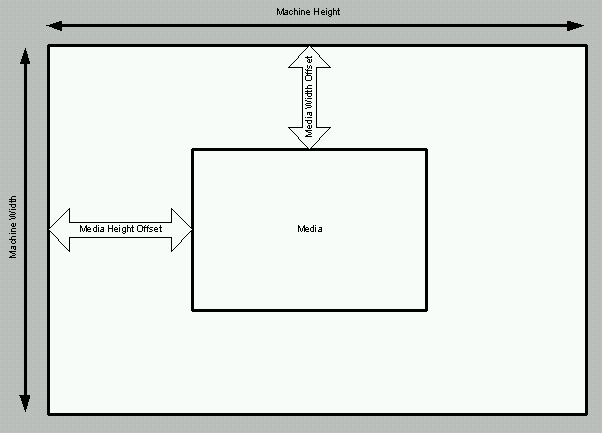
In order to activate a punch system from the Brisque, all the punch units in
that system must be within the media square area.
Description
Parameters
Machine Origin
Width: Drum home position
Height: Carriage home position.
Media Size
Each media has two size parameters:
Media width size
Media height size
Media Offset
Each media has offset from the machine origin:
Media width offset - MACHINE/Width Start Image Area For Plate (mm)
Media height offset - MACHINE/Height Start Image Area For Plate (mm)
+ (MACHINE/Max Media Height Size (mm) - media height size) / 2
Media Square Area
The media square area is related to the origin:
Width: From Media Width Offset to Media Width Offset + Media Width Size
Height: From Media Height Offset to Media Height Offset + Media Height Size
Punch Motor Position
Each punch motor has position from the machine origin
Width: LOCAL 3\PUNCH MOTORS\Punch Motor #01\Width Pos (mm)
Height: LOCAL 3\PUNCH MOTORS\Punch Motor #01\Height Pos (mm)
Punch Unit
Equals Punch Motor
Punch System
Contains Punch Units
Example 1 - Kodak:
Media Size
Media Width Size = 770
Media Height Size = 1030.
Media Offset
Media Width Offset = MACHINE\Width Start Image Area For Plate (mm) = 48.3
Media Height Offset = MACHINE\Height Start Image Area For Plate (mm) + (MACHINE\Max
Media Height Size (mm) - Media Height Size) / 2
= 48.3 + (1130 -1030) / 2 = 99.3
Media Square Area
Width: from Media Width Offset (48.3) to Media Width Offset + Media Width
Size (48.3 + 770) = 818.3
Height: from Media Height Offset (99.3) to Media Height Offset + Media Height
Size (99.3 + 1030) = 1129.3
Bucher punch system includes
Punch Motor #01 (w,h) position = (50, 100)
Punch Motor #02 (w,h) position = (40, 300)
= Punch Motor #01 is within the media square but Punch Motor #02 is outside
(the punch width position [40], is less than Media Width Offset [48.3] )
Therefore you cannot use this punch system for the Kodak
media.
If you try to use it, the error message punch system is not available
appears.
Example 2 - Kodak:
Media Size
Media Width Size = 450
Media Height Size = 550.
Media Offset
Media Width Offset = MACHINE\Width Start Image Area For Plate (mm) = 48.3
Media Height Offset = MACHINE\Height Start Image Area For Plate (mm) + (MACHINE\Max
Media Height Size (mm) - Media Height Size) / 2
= 48.3 + (1130 - 550) / 2 = 339.3
Media Square Area
Width: from Media Width Offset (48.3) to Media Width Offset + Media Width
Size (48.3 + 450) = 498.3
Height: from Media Height Offset (339.3) to Media Height Offset + Media Height
Size (339.3 + 550) = 889.3
Storser punch system includes:
Punch Motor #01 (w,h) position = (50, 200)
Punch Motor #02 (w,h) position = (50, 500)
= Punch Motor #02 is within the media square but Punch Motor #01 is outside
(the punch height position [200] is less than Media Height Offset [339.3]
)
Therefore you cannot use this punch system for the Kodak
media.
If you try to use it, the error message punch system is not available
appears.
Conclusions
Increase the punch unit width position so that it is larger than MACHINE\Width
Start Image Area For Plate (mm).
Do not change MACHINE\Width Start Image Area For Plate (mm).
From version 3.50.05 (Quantum), the default for this parameter was changed
to 50.
After installation of a punch system, change the punch motor position according
to the machine origin