Home | Contact Us | Submit Troubleshooting Info | Search | Help
Output | Software Solutions | Proofing | Color, Screening and Calibration | Scanning | Digital Photography | Consumables | POS
Home | Contact Us | Submit Troubleshooting Info | Search | Help
Output | Software Solutions | Proofing | Color, Screening and Calibration | Scanning | Digital Photography | Consumables | POS
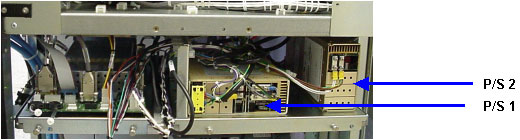
The Lotem 800 Quantum has two power supplies for the head:
The input voltage to both power supplies is 208 VAC.
Note: The power supplies are located on the left side of the machine.
Warning: You must wear anti-static wrist straps for part of this procedure.
Use the following steps to remove and replace any one of the power supplies: