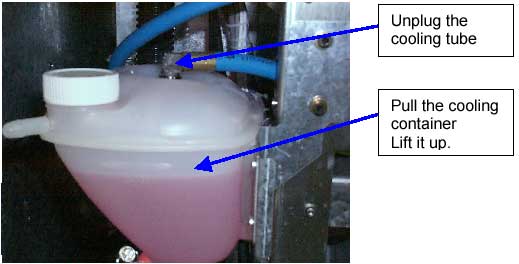
The XY vacuum pump in the Lotem 800 Quantum is located behind the cooling system.
In order to reach it, you must first to deal with the cooling container.
Note: It is recommended not to open the cooling system in order to reach
the XY vacuum pump. It can cause a leakage problem.
Procedure
Shut down the machine.
Disassemble the Dis. Box Panel.
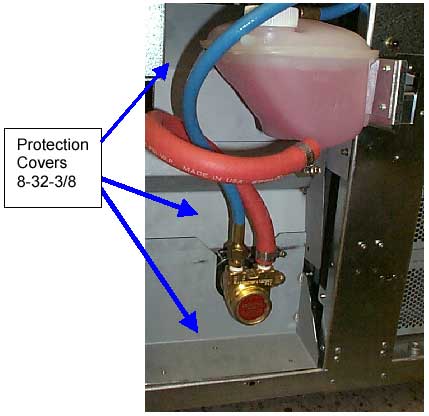
Disassemble the three protections covers; be careful not to damage the liquid
tubes.
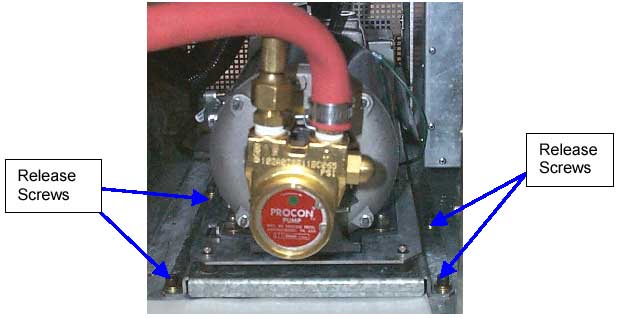
Disassemble the 4 screws that hold the pumps tray to the chassis.
Disassemble the XY vacuum pump power connector and J8 on the distribution
box.
Release all the bands along the XY power cable.
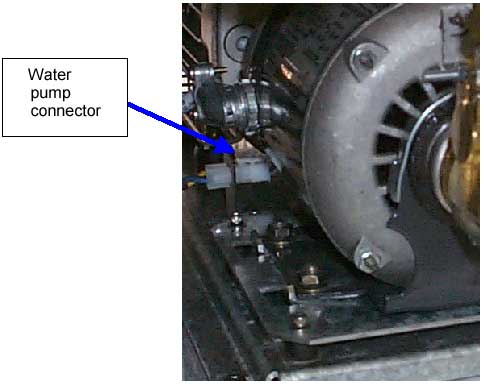
Unplug the water pump connector.
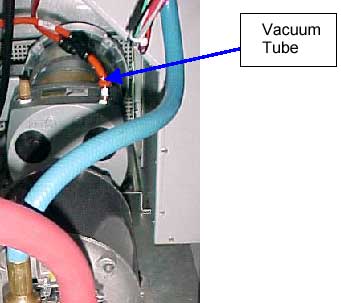
Unplug the XY vacuum pump tube (orange tube)
Unplug the quick connector (blue) attached to the container
Pull up the cooling container. Be careful not to spill the cooling liquid.
Hang it in a way that the liquid will not spill out. Take extra coition make
sure the liquid will not spill on the TMCE board.
Slide the pumps tray out of the machine. Be careful not to damage the liquid
tubs.
Disassemble the four ¼ hax screws holding the XY vacuum pump to
the tray.
Replace the XY vacuum pump, assemble the screws holding the XY vacuum pump.
Slide the tray in and assemble the screws holding the tray to the chassis.
Slide the liquid container back, and plug the quick connector to it.
Route the XY vacuum pump power connector behind the distribution box, and
connect it to P8.
Assemble the four ¼ allen screws to hold the tray.
Plug in the vacuum tube.
Connect the water pump power connector.
Assemble the protection covers that were removed in step 3.
Assemble the Dis. Box Panel.
Turn on the machine.
Test
Check that there is no water leakage from the water pump or the liquid tubes.
Operate the XY vacuum pump.
Perform 5 loading sequences, see that there are no loading problems.