Home | Contact Us | Submit Troubleshooting Info | Search | Help


    Output | Software Solutions | Proofing | Color, Screening and Calibration | Scanning | Digital Photography | Consumables | POS


Preventing 40-GB hard drive failures on Lotem platesetters


Product

 
  • Lotem® 800
  • Lotem 800 II
  • Lotem Quantum
  • Lotem Quantum Spectrum
  • Lotem 400
  • Lotem 400 Quantum
  • Lotem 400 Xpose
  • Lotem 200K

Operating system

 
  • Windows® 95
  • Windows 2000

Component


40-GB hard drives (part number 607A20360).


Error


Application error 29004 read sector failure, results=1, drive=0, sector 5762577.
If this problem persists, contact technical support - Seagate


Symptoms


The following error message Application error 29004 read sector failure, results=1, drive=0, sector 5762577.
If this problem persists, contact technical support - Seagate
appears when the PC starts up, and consequently the following software fails to load on a 40-GB hard drive:

  • Microsoft® Windows 95
  • Windows 2000
  • Image files (Symantec's Norton Ghost™)

Cause


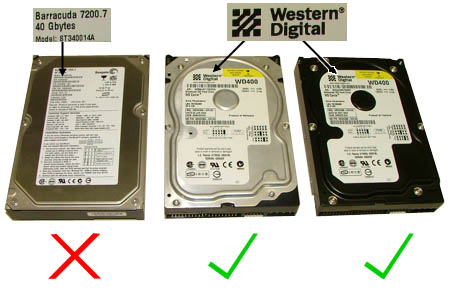
The Seagate® Barracuda 40 GB hard drive (model number ST340014A) is not approved for Lotem platesetters.
If you try to install this specific hard drive on a Lotem platesetter, you will be unable to load Windows 95, Windows 2000 or an image file.


Solution


Do not install a Seagate Barracuda 40 GB hard drive that has a model number ending in “14A” - for example ST340014A.
This specific Seagate hardrive is not approved for Lotem platesetters.

Only install the following approved 40-GB hard drives:

  • Western® Digital WD400 (made in Malaysia)
  • Western® Digital WD400 (made in Thailand)


Technical contact(s)
 

Itai Peperovich

Submitted by
 

Itai Peperovich

Date submitted
 

30 Aug 2004


    Copyright © 2005 Creo Inc. All rights reserved. Confidential. Back to top.