Home | Contact Us | Submit Troubleshooting Info | Search | Help
Output | Software Solutions | Proofing | Color, Screening and Calibration | Scanning | Digital Photography | Consumables | POS
Home | Contact Us | Submit Troubleshooting Info | Search | Help
Output | Software Solutions | Proofing | Color, Screening and Calibration | Scanning | Digital Photography | Consumables | POS
Product |
|
||
Symptoms |
|
||
Cause |
Punch motor is not strong enough to complete its cycle of punching through two or more plates. |
||
Solution |
The solution for releasing a plate from the punch is dependant on whether the platesetter has a Local2 board or a Local3 board installed: Solution for platesetters with Local2 boards In the Registry, change the punch’s direction of rotation. This causes the punch to rotate back to its previous home position, and then the plate can be easily pulled out from the punch. To change the punch’s direction of rotation:
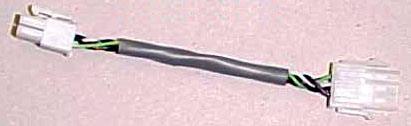
Note: There is no need to change this parameter back to its original value, because the punching action is symmetrical, meaning it does not matter in which direction the motor rotates. Solution for platesetters with Local3 boards If a platesetter has a Local3 board installed, it is not possible to change the punch’s direction of rotation via the Registry. However, an adaptor cable has been designed to perform the same function. When the punch direction inverter cable (part number 504L3E525) is installed between the punch and the platesetter’s female connector, it reverses the direction of the punch motor. This action elevates the punch pin from the plates and allows the plates to be released. To install the inverter cable and release plates stuck in the punch:
|
||
Technical contact(s) |
|||
Submitted by |
|||
Date submitted |
18 Oct 2004 |
||