Home | Contact Us | Submit Troubleshooting Info | Search | Help
Output | Software Solutions | Proofing | Color, Screening and Calibration | Scanning | Digital Photography | Consumables | POS
Home | Contact Us | Submit Troubleshooting Info | Search | Help
Output | Software Solutions | Proofing | Color, Screening and Calibration | Scanning | Digital Photography | Consumables | POS
Each FCO kit is shipped with a CD containing the FCO Updater Utility.
The FCO Updater Utility updates a platesetter’s registry—enabling
service personnel to keep track of the FCOs implemented on a specific platesetter.
What is FCO Updater? More...
FCO Updater is a small utility which updates the platesetter’s
registry with a list of FCOs performed on the device. The utility enables
service personnel to keep track of the FCOs implemented on a specific platesetter.
Whenever an FCO is implemented, the service engineer must install the latest
version of FCO Updater (available for downloading from either the FCO page
or the FCO Update Utility CD).
Why do I need FCO Updater? More...
Is FCO Updater compatible with all Lotems and all operating systems? More...
FCO Updater is compatible with all Lotem models and all versions of Microsoft® Windows® operating systems.
How do I implement FCO Updater? More...
FCO Updater is released on both CD-ROM and from TechPlanet.

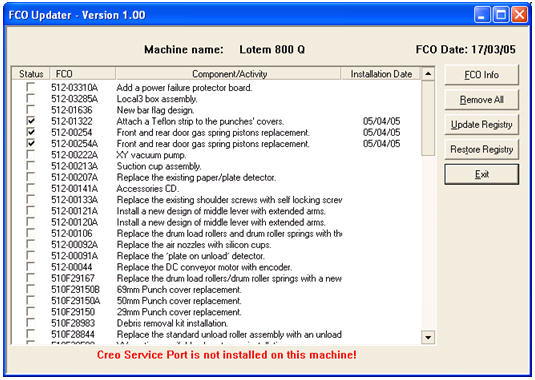
How do I navigate through the FCO Updater Version 1.00 dialog box? More...
The FCO Updater Version 1.00 dialog box appears after the current list of
FCOs is backed up from the registry to C:\FCOBackup:

How do I maintain FCO lists? More...
Included on the FCO Update CD-ROM are several text (.txt) files. These files
describe the contents of the FCO lists. The test file’s name reflects
the platesetter’s model. For example, the Lotem 800 Q.txt
file contains a list of all FCOs that are applicable to the Lotem 800 Quantum
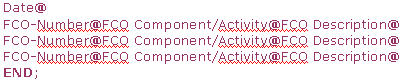
platesetter. The format of the file is as follows: