Home | Contact Us | Submit Troubleshooting Info | Search | Help


    Output | Software Solutions | Proofing | Color, Screening and Calibration | Scanning | Digital Photography | Consumables | POS


Adjusting the Nozzle Position on ThermoFlex Mid and Narrow


Product

 
  • ThermoFlex® Mid
  • ThermoFlex Narrow

Background


In order for the nozzle to vacuum all of the ablation created during the expose process, the nozzle must be positioned 0.5 mm from the plate. This procedure describes how to adjust the nozzle position.


Procedure

 
  1. Load a plate of a known thickness on the drum.
  2. In the Media Definition dialog box, check the Focus value defined for that plate thickness, and move the focus motor according to that value.
  3. From the milky-colored protective layer used for the plates, cut four strips of about 1" X 4" and place them one on top of the other to form a 0.5 mm jig.
  4. Place the jig between the vacuum nozzle and the plate.
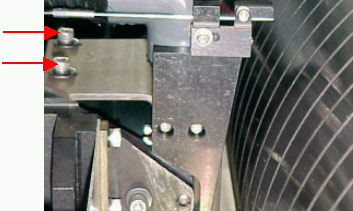
  5. Loosen (but do not remove) the two screws on the nozzle assembly.
  6. Move the nozzle assembly back and forth until the jig enters the space between the vacuum nozzle and the plate smoothly, but without extra space.
  7. Remove the jig.
  8. Tighten the two screws that you loosened in step 5.
  9. Insert the jig between the vacuum nozzle and the plate to verify that the distance did not change after you tightened the screws.

Technical contact(s)
 

Content owner: Viki Arviv
See the Escalation page for escalation contacts.

Date submitted
 

02 Feb 2002


    Copyright © 2005 Creo Inc. All rights reserved. Confidential. Back to top.