Home | Contact Us | Submit Troubleshooting Info | Search | Help


    Output | Software Solutions | Proofing | Color, Screening and Calibration | Scanning | Digital Photography | Consumables | POS


Creating a BIOS Disk and Uploading BIOS for Windows XP-compatible CPU on ThermoFlex Mid II Hybrid and Narrow Hybrid


Product

 
  • Kodak® ThermoFlex® Mid II Hybrid platesetters
  • ThermoFlex Narrow Hybrid

Operating system

  Microsoft® Windows® XP

Background


This procedure describes how to create a BIOS disk for the Windows XP-compatible CPU for ThermoFlex Mid and Narrow Hybrid devices, and how to upload the BIOS.


Requirements


Formatted disk


Procedure


Creating a BIOS disk:

  1. From the relevant Download page on TechPlanet, download the BIOS .exe file to a folder on your desktop.
  2. Insert a formatted disk into the disk drive.
    Note: To be able to write on the disk, you may need to close the window tab on the disk.
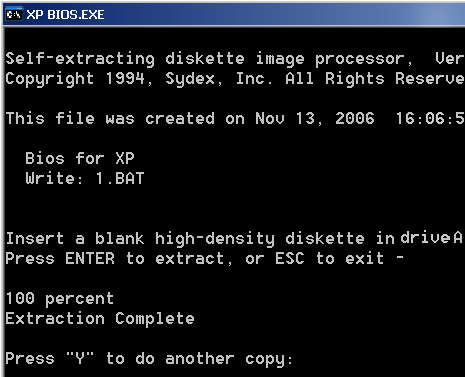
  3. Navigate to the folder in which you saved the BIOS file and double-click the BIOS .exe file. The following screen appears:


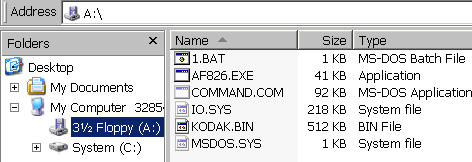
    The BIOS .exe file creates six new files on the floppy disk.


  1. Remove the disk from the disk drive.

Uploading the BIOS:

  1. Access the E-box and insert the BIOS disk that you created into the floppy drive.
  2. Restart the platesetter.
  3. In the DOS screen, type 1.Bat and press Enter.
    Important: Do not stop the BIOS loading process. Stopping the BIOS loading process may damage the CPU board.
  4. When the BIOS is uploaded, a message appears.
    Remove the BIOS disk from the disk drive, and press the F1 key.

Technical contact(s)
 

Content owner: Viki Arviv
See the Escalation page for escalation contacts.

Date submitted
 

30 Nov 2006


    Copyright © 2005 Creo Inc. All rights reserved. Confidential. Back to top.