|
Product
|
|
- Kodak ThermoFlex Mid
- ThermoFlex Narrow
|
|
Background
|
|
This procedure describes how to replace the resolution motor.
|
|
Procedure
|
|
When removing the resolution motor, mentally note how the resolution
motor fits with the head rotation arm. It must be reassembled properly.
- In ThermoFlex Controller, send the carriage to a position that
enables you to work comfortably on the head.
- Take the necessary steps to access the carriage.
- Quit ThermoFlex Controller, turn off the platesetter, and disconnect
the main power supply.
- Disconnect the two detector connectors and the motor power connector.
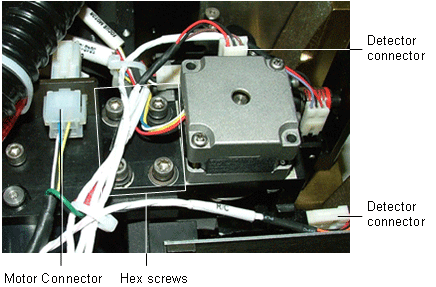
- The fork that positions the diodes to change the resolution is connected
to the resolution motor base with two springs. To release these two
springs, manually rotate the resolution motor until the fork descends
all the way down and the pressure on the two springs is reduced. Then
release the two springs from the fork.

- At the top back of the head assembly on the resolution motor, remove
the four hex screws, shown in step 4.
Note: Underneath one of the four hex screws is the earth wire.
- Remove the resolution motor.
- Install the new resolution motor with the fork on top of the fork
support, as shown earlier.
- Insert the exposed earth wire under one of the resolution motor screws,
and tighten the four hex screws.
- Hook the two springs to the fork.
- Connect the detector connectors and the motor power connector that
you disconnected in step 4.
- Close any open doors and panels of the platesetter.
|
|
Test |
|
- Turn on the platesetter and start ThermoFlex Controller.
- Verify that the resolution motor moves freely:
- Select Hardware > Database > Resolution Motor.
- In the Resolution Motor menu, in the Properties tab,
check the Max Pos App parameter value.
- Move the resolution motor back and forth a few times between home
position (HP) and the Max Pos App parameter value.
- Verify that the focus motor moves freely:
- Select Hardware > Database > Focus Motor and check the
Max Pos App parameter value.
- From the Focus Motor menu, move the focus motor back and forth
a few times between HP and the Max Pos App parameter value.
- Fully calibrate the platesetter, including focus, drum speed, resolution,
delay and elevation.
|
|
Technical contact(s)
|
|
Content owner: Viki Arviv
See the Escalation page for escalation
contacts.
|
Date submitted
|
|
24 Apr 2006
|

