Home | Contact Us | Submit Troubleshooting Info | Search | Help
Output | Software Solutions | Proofing | Color, Screening and Calibration | Scanning | Digital Photography | Consumables | POS
Home | Contact Us | Submit Troubleshooting Info | Search | Help
Output | Software Solutions | Proofing | Color, Screening and Calibration | Scanning | Digital Photography | Consumables | POS
Abstract
This Procedure is to adjust the air pressure detector when filter close
lights are on all time and all the filters are new.
Prior to the procedure:
Procedure
Note: Disconnect the Vacuum Pump from the power supply.
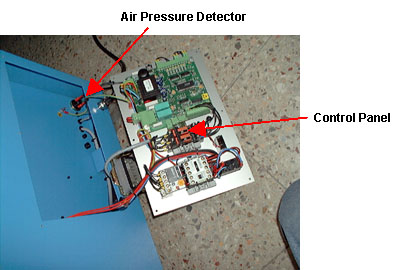
Figure 1 - Control Panel Open
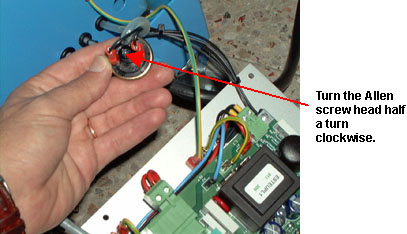
Figure 2 - Pressure Detector