

Home | Contact Us | Submit Troubleshooting Info | Search | Help
Output | Software Solutions | Proofing | Color, Screening and Calibration | Scanning | Digital Photography | Consumables | POS
Home | Contact Us | Submit Troubleshooting Info | Search | Help
Output | Software Solutions | Proofing | Color, Screening and Calibration | Scanning | Digital Photography | Consumables | POS
Yaron Soffer
18-Mar-02
The purpose of version 1.20.09 is to solve known bugs related to ThermoFlex 4045 and 2630 machines from versions 1.10.03 and 1.20.01. These Release Notes contain the changes and additions that have been made since version 1.20.01 was released. This document is an addition to FCO 510F27330.
Brisque
- Identifies the ThermoFlex machine type (4045 or 2630). See Changes from Previous Version, later in this document.
- The number of beams changes according to resolution and frequency.
Note: This option operates only with the Flexo Upd file for Brisque (included in the FCO 510F27330 kit).- Filters the Highlight dots in the exposed file.
Lotem
- Supports Distribution Revision B (not C)
- Supports MCF Revisions A and C
- Preventive Maintenance option
When you select this option, the carriage moves to the center of the drum, and the front door opens, providing easy access for preventive maintenance.
Note: No message appears regarding the opening of the front door.- Plate Detector option
The purpose of the Plate Detector is to prevent the plate from hitting the Exposing Head.
When an exposed file is sent, the Focus Motor moves to a position determined by the plate thickness, and the carriage moves to Start Expose position. If a thicker plate is loaded, the Exposing Head may hit the plate, unless the Plate Detector is installed in front of the Exposing Head.
When the Plate Detector status changes to on, the Focus Motor moves to HP.
The FCO 510F27330 kit includes a document describing the installation procedure.
Define the location of the Focus Motor after performing the Focus Test Procedure.
During the Expose stage, the Plate Detector is disabled, and does not influence the operation of the machine during Expose time.- Focus Motor position for a new plate
When a new plate is defined, the Focus Motor value is left empty. Unlike other Lotem machines, the ThermoFlex focus motor movement is not linear, so there is no way to calculate the Focus Motor position for a new plate.- Log file
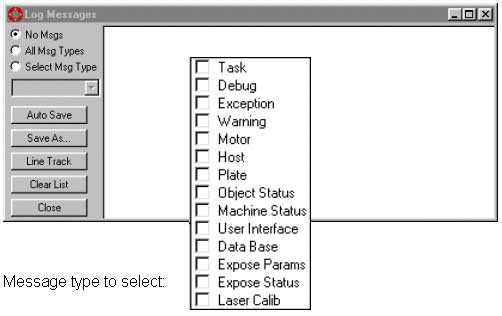
New Message Type options were added for better message selection:
- Advanced Media dialog
The range of media attributes was expanded. As a result, the media data base files have undergone a change and several advanced media attributes were added to each media file.
In addition, changes and improvements were made to the buttons:
- The New button now clears all media attributes and forces the user to set all attributes for the new media.
- The new Modify button enables modifying the attributes of an existing media.
To view and edit the new media attributes:
- Change the User Type parameter to Expert.
- Open the Media Definition dialog box.
- Click the Adv. button. The Media Advanced Properties dialog box appears:
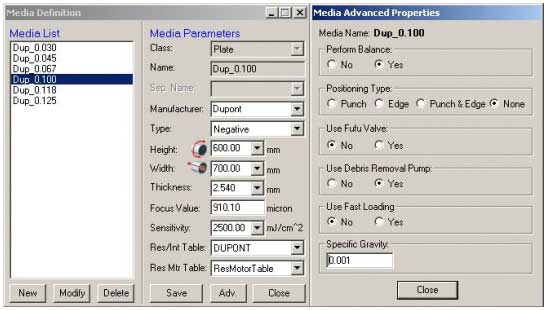
- Perform Balance: Determines whether the drum must be specifically balanced for the media before loading it. For ThermoFlex machines, the value is Yes.
- Media Positioning Type: Determines the method by which the location of the edge of the media is found before the exposure process begins. Several methods are available: Edge Detection, Spiral Punch, Both or None. For the ThermoFlex machine, the value is None.
- Use Fufu Value: Determines whether to operate, during the expose process, an air valve for diverting media debris from the laser lens. For the ThermoFlex machine, the value is No.
- Use Debris Removal Pump: Determines whether to operate, during the expose process, a vacuum pump to collect media debris from the laser lens area. For the ThermoFlex machine, the value is Yes.
- Use Fast Loading: For the ThermoFlex machine, the value is No.
- Specific Gravity: Represents the specific gravity of the media in grams per cubic mm, used primarily for the drum balancing process.
Note: At the end, change the User Type parameter to User.
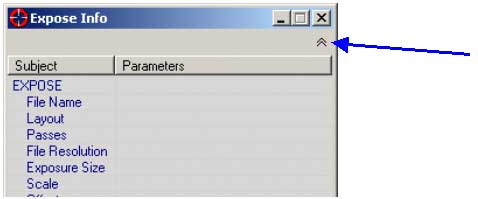
- Toggle between two display modes - Compact and Normal - for the Expose Info dialog. In Compact mode, only the Expose Progress bar appears.
- Automatic logging during Start-up.
This is saved under the Log directory in a file named Startup.Log.
In the command line, add argument - l to create unique log files for each and every start-up.- Measurement unit memory - mm and inch units
The type of measurement units last used (mm/inch) is automatically used upon the next start-up of the machine.
Changes from Previous Version
Version 1.20.09 contains new parameters:
- Machine Type (…Scitex>Projects>LotemFlexo>Machine>Type)
Change the machine name according to the Brisque version:
- Brisque Ver 4 - LotemFlex4045 or LotemFlex2630
- Brisque Ver 3 - LotemFlexo (for 4045 and 2630 machines)
- Anti Collusion Detector (… Scitex>Projects>LotemFlexo>IO OBJECTS>
LOCAL 3>DETECTORS>Anti Collision Detector à Detector Active State)
To activate the Anti Collusion Detector (Plate Detector), set the Active State parameter to 1.
System Requirements
- Brisque Ver 4.0.97 or higher and the Upd_Flexo file.
- The FCO to replace the Loading/Unloading tray:
- 510F27849 - ThermoFlex 2630 Load Tray for Cleaning.
- 510F27849A - ThermoFlex 4045 Load Tray for Cleaning
Known Bugs
- For ThermoFlex 4045 (only), Strobe 7 does not support full format. The maximum file size supported is 990 x 1150 mm (the same as for Strobe 5).
- Distribution - Supports comp levels B and C.
- Tec System - Should be Open (open = 1), but if you double-click Tec system (Expose System\Laser System\Tec System), the software crashes.
Fixed Bugs
- Supports the full format size (ThermoFlex 4045 - with Strobe 5 only)
- Supports any plate size or thickness within the specifications
- Bugs related to Load/Unload plates with Brisque Version 4
- Bug related to balance in ThermoFlex 2630
- Calibration process bug with speed = 300
- New DDB load files for VLSI configuration that solved the DDB Put and Get communications failures
For TSP configuration this bug was solved from Lotem 800 version 3.20.01Installation Notes
- Before installing the new software, save the Registry file on a floppy diskette. This Registry file is useful for the previous version only.
- Save the DataBase folder on a floppy diskette.
- Write down the IP address of the PC.
- The Plate Detector does not automatically open after installation.
To open the Plate Detector go to Hardware à Others:
- Select \IO OBJECTS\Anti Collision System, and change the Open parameter to 1. (Or, in RegEdit, Scitex\Projects\LotemFlexo\IO OBJECTS\Anti Collision System)
- Select \IO OBJECTS\Anti Collision Detector, and change the Open parameter to 1. (Or, in RegEdit, \Scitex\Projects\LotemFlexo\IO OBJECTS\LOCAL 3 \DETECTORS\Anti Collision Detector)
Post Installation ATP
- After installing the software, continue implementing the rest of the FCO (such as Plate Detector installation, Brisque update, and so on).
- Expose full format:
ThermoFlex 4045 - 990 mm x 1150 mm
ThermoFlex 2630 - 635 mm x 762 mm