Home | Contact Us | Submit Troubleshooting Info | Search | Help


    Output | Software Solutions | Proofing | Color, Screening and Calibration | Scanning | Digital Photography | Consumables | POS


Magnus 400 Controller communication with MCE is slow and <Unauthenticated User> appears in the Quick Launch tray


Product

 
  • Kodak® Magnus™ 400
  • Magnus 400 E
  • Magnus 400 Quantum

Symptoms

 
  • Magnus 400 Controller slow to establish communication with MCE device.
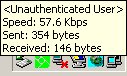
  • When communication is established, the Unauthenticated User icon appears in the Microsoft Windows® Quick Launch tray


Cause


On Magnus 400 configurations with disc image version 1.14, the network setting is configured differently than on other MCE devices.


Solution

 
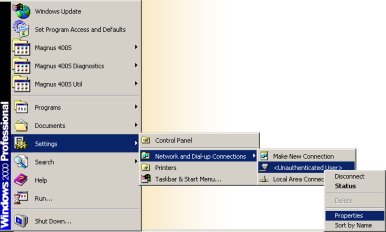
  1. On the Microsoft Windows desktop, select Settings > Network and Dial-up Connections > <Unauthenticated User> and right-click Properties.


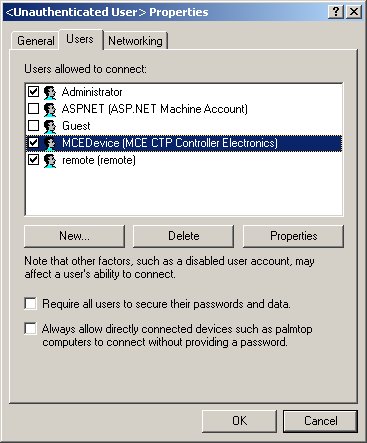
  2. In the <Unauthenticated User> Properties dialog box, on the Users tab, clear the Always allow directly connected devices such as palmtop computers to connect without providing a password check box, and click OK.


  3. Restart the computer for your changes to take effect.
  4. On the desktop, right-click My Computer and select Manage.
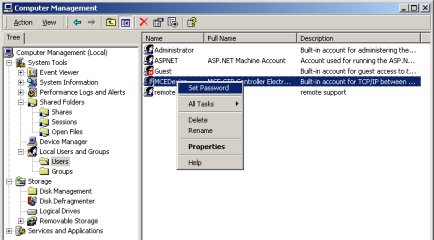
  5. In the Computer Management window, in the Computer Management (local) tree, select System Tools > Local Users and Groups > Users.
  6. In the right pane, right-click MCEDevice and select Set Password.


  7. In the Set Password dialog box, in the New Password and Confirm Password fields, type Creo1Spot, and click OK.
  8. Close the Computer Management window, and restart the computer.

Technical contact(s)
 

Alon Davidor

Submitted by
 

Greg Banks

Date submitted
 

29 Apr 2008


    Copyright © 2005 Creo Inc. All rights reserved. Confidential. Back to top.