Home | Contact Us | Submit Troubleshooting Info | Search | Help
Output | Software Solutions | Proofing | Color, Screening and Calibration | Scanning | Digital Photography | Consumables | POS
Home | Contact Us | Submit Troubleshooting Info | Search | Help
Output | Software Solutions | Proofing | Color, Screening and Calibration | Scanning | Digital Photography | Consumables | POS
Product |
|
||
Component |
Stepper motor, black (part number 184-00098) |
||
Symptoms |
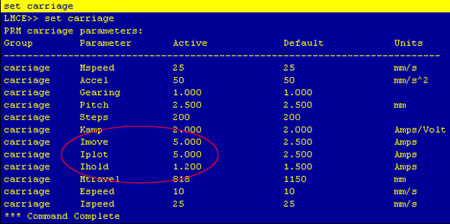
The carriage does not move. |
||
Cause |
The ampere values in the LMCE/TMCE were not calibrated for the LIN engineering stepper motor. |
||
Solution |
|
||
Technical contact(s) |
|||
Submitted by |
|||
Date submitted |
11 Feb 2008 |
||