

Home | Contact Us | Submit Troubleshooting Info | Search | Help
Output | Software Solutions | Proofing | Color, Screening and Calibration | Scanning | Digital Photography | Consumables | POS
Home | Contact Us | Submit Troubleshooting Info | Search | Help
Output | Software Solutions | Proofing | Color, Screening and Calibration | Scanning | Digital Photography | Consumables | POS
Simulation mode is a troubleshooting tool that allows you to extract information about the various data paths and related hardware components. This information helps to diagnose the cause of problems related to data flow and connections between the various electronic boards and drivers. By allowing you to zero in on the suspected data path and related components, Simulation mode helps to save time and costs.
In Simulation mode, you can isolate the suspected data path and run a simulated job.
This document describes how to use simulation mode, and describes the various simulation options.
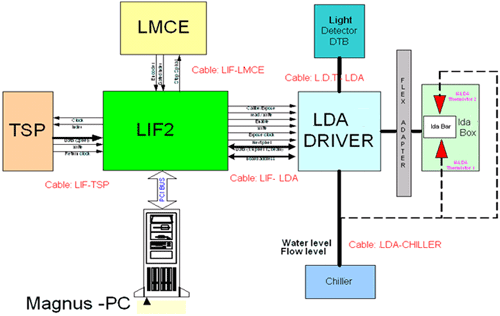
To access Simulation mode:
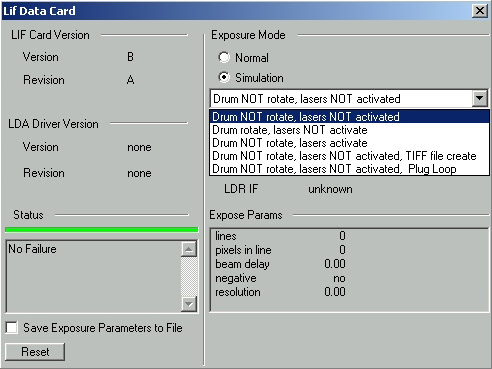
In Simulation mode, you can run an expose job in one of the following scenarios:
| Mode | Isolates |
Functions
|
Indicates problem with | |||
| TSP sends data to LIF | LMCE rotates drum | LDA activates lasers | LIF sends data | |||
| Drum NOT rotate, lasers NOT activated | TSP data path |
yes | no | no | to air |
° Data |
| Drum rotate, lasers NOT activated | LMCE data path |
yes | yes | no | to air |
° Stop spiral |
| Drum NOT rotate, lasers activated | LDA data path |
yes | no | yes | to plate |
° Head related data |
| Drum NOT rotate, lasers NOT activated, TIFF file create |
TSP debugs |
yes | no | no | to disk, creates Tiff File lif_out_.tif |
° Data |
| Drum NOT rotate, lasers NOT activated, plug loop | LIF | yes | no | no | to air |
° LIF board |
| In the future you will be able to insert the plug into the J6 connector on the LIF board. | ||||||