Home | Contact Us | Submit Troubleshooting Info | Search | Help


    Output | Software Solutions | Proofing | Color, Screening and Calibration | Scanning | Digital Photography | Consumables | POS


Installing GMCE firmware and TH3 firmware on a Magnus 800 platesetter


Product


Kodak® Magnus™ 800 platesetter


Background


This procedure describes how to install GMCE firmware and TH3 firmware on a Magnus 800 platesetter.


Procedure


Installing GMCE Firmware

The latest core and product firmware is located in the GMCE folder (C:\ServiceShell\GMCE). The firmware must be installed onto the GMCE.

Core Firmware Installation

  1. If required, turn on the Magnus 800 platesetter.
  2. Make sure all the platesetter doors are closed, and all the panels are installed
  3. Locate the GMCE folder and double-click GMCECoreFirmware 1.30.03B1.exe.
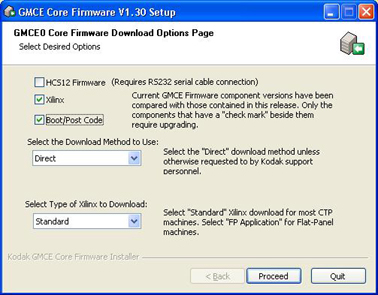
  4. Follow the on-screen installation procedures. When the GMCE Core Firmware Download Options Page dialog box appears, check the Xilinx and Boot/Post Code check boxes, but clear the HCS12 Firmware check box.


  5. Proceed with the on-screen installation procedures until the firmware has been successfully installed.

Product Firmware Installation

  1. Locate the GMCE folder and double-click Magnus800_Firmware 1.12.01.exe.
  2. Follow the on-screen installation procedures until the firmware has been successfully installed.

Installing TH3 Firmware

  1. Locate the GMCE folder (C:\ServiceShell\GMCE) and double-click TH3
    Firmware Installer 1.04.06Release.exe
    .
  2. Follow the on-screen installation procedures until theTH3 firmware has been successfully installed.

Technical contact
 

Content owner: Nir Peleg
See the Escalation page for escalation contacts.

Date submitted
 

17Feb 2008


    Copyright © 2005 Creo Inc. All rights reserved. Confidential. Back to top.