
Home | Contact Us | Submit Troubleshooting Info | Search | Help


    Output | Software Solutions | Proofing | Color, Screening and Calibration | Scanning | Digital Photography | Consumables | POS
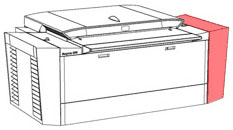
Opening the right side door of the Magnus 800

  1. Open the right side door of the platesetter:


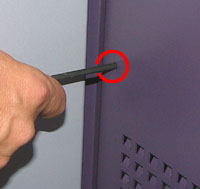
  2. Insert a small hex key through the hole on the right panel. The hole is located just above the air ventilation holes:


  3. Slightly push the hex key into the hole until the right door is released.
    Note: At this stage the door is still latched and you will not be able to open it.
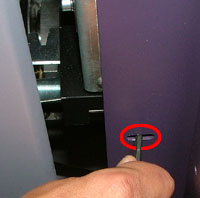
  4. Remove the hex key and insert it into the adjacent hole located at the opening of the right door.


  5. Release the door latch by pushing the hex key in the direction of the platesetter. The right door is unlatched and can now be fully opened.

    Copyright © 2005 Creo Inc. All rights reserved. Confidential. Back to top.