Home | Contact Us | Submit Troubleshooting Info | Search | Help


    Output | Software Solutions | Proofing | Color, Screening and Calibration | Scanning | Digital Photography | Consumables | POS


Releasing a stuck plate from the Magnus 800 drum


Product


Magnus 800 platesetter


Error


The following error messsages may appear in Magnus Controller:

  • 4376 The TECs should be on the drum, but they are still on the TEC actuator.
  • 4378 The TEC actuator is still on the drum. The TECs may be in the wrong position.
  • 4379 All of the TECs should be on the drum, but several TECs are still on the actuator.
  • 4380 The plate size is incorrect. It should be %.2f, and not as measured by the platesetter (%.2f).
  • 4384 The TECs have not been removed from the drum.
  • 4385 The Unloading platform near drum detector did not detect a plate. The plate may not have reached the unloading platform.
  • 4386 The plate is not positioned correctly against the drum registration pins.
  • 4387 The plate is still on the drum. The Unloading platform near drum detector detects a plate.
  • 4389 A plate is stuck between the drum and the unloading platform.
  • 4391 The TECs are probably not in the parking position. All the TEC-on-actuator detectors did not detect the TECs.
  • 4393 The TECs are probably not in the parking position. Several of the TEC-on-actuator detectors did not detect the TECs.

Symptoms

 
  • The platesetter makes unusual noises.
  • The flyoff detector activates and error messages appear in Magnus Controller.

Cause


One of the following is likely to be the cause:

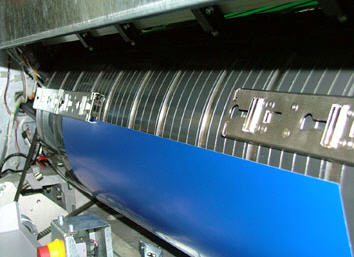
  • One or more of the TECs fell off the drum:


  • Plate is not securely held by the TECs:


  • TECs were not lowered from the TEC actuator, and the plate is only attached by the LECs:


Solution

 
  1. Raise the loading conveyor.
  2. Remove the upper front panel.
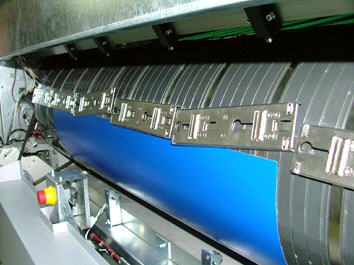
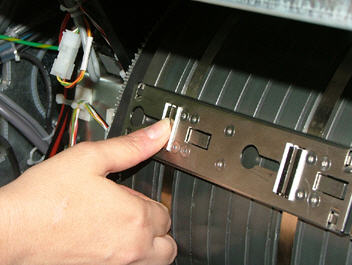
  3. Locate each of the six TECs:
    • Remove any TECs remaining either on the drum or the plate.
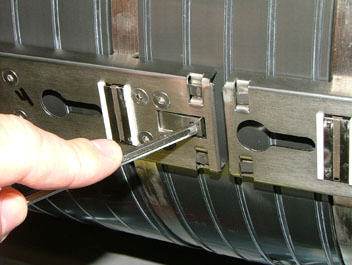
    • On each TEC, use a hex key to press on each of the two levers, and unlock the TEC:


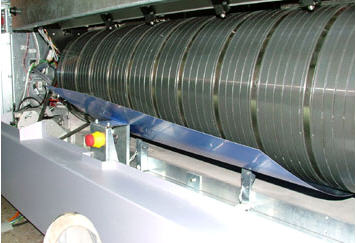
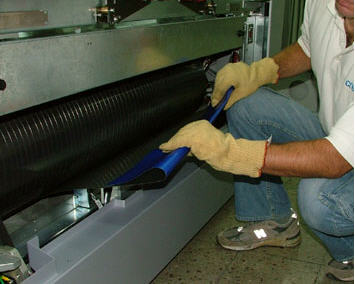
  4. Wearing protective gloves, bend the plate and gently pull it towards you:


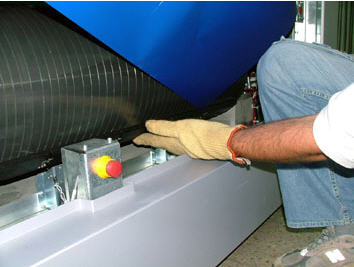
  5. Press the center of each LEC to release the edge of the plate:


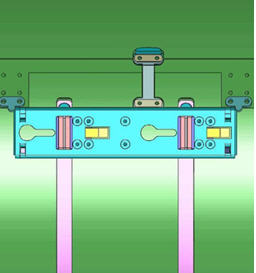
  6. Reinstall the six TECs back onto the drum in their parking position:
    • Align each TEC to the TEC actuator on the drum according to the sticker located on the platesetter:


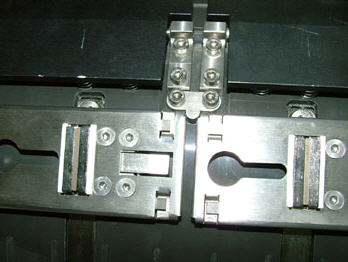
  7. Lock each TEC into position by pressing down on the two magnets:


  8. Reinstall the upper front panel.
  9. Lower the loading platform.
  10. Lower the loading conveyor.

Technical contact(s)
 

Itai Peperovich

Submitted by
 

Itai Peperovich

Date submitted
 

06 Jul 2005


    Copyright © 2005 Creo Inc. All rights reserved. Confidential. Back to top.