Home | Contact Us | Submit Troubleshooting Info | Search | Help


    Output | Software Solutions | Proofing | Color, Screening and Calibration | Scanning | Digital Photography | Consumables | POS


How to ensure that the paper picker gripper successfully grips the slip sheet on the Magnus 800 Autoloader


Product


Kodak Magnus 800 Autoloader


Background


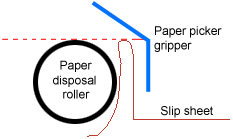
A successful paper disposal sequence is partly dependent upon the position of the slip sheet in relation to the paper picker gripper. If the paper disposal roller rotates either too much or too little then the paper picker gripper may fail to grip the slip sheet, resulting in paper disposal failures.

This procedure describes how to determine the optimum amount the paper disposal roller must rotate in order for the slip sheet to be gripped by the paper picker gripper.


Procedure

 
  1. In Kodak Magnus Controller, perform the following actions:
    1. Locate the Paper picker motor dialog box, and send the paper picker motor to home position.
    2. Locate the Paper picker arm valve dialog box, and lower the paper picker arm.
    3. Send the paper picker motor to position 50 mm at a speed of 30 mm/second.
  2. On the autoloader, ensure that the paper picker gripper grips the slip sheet at the optimum position.
    Important: The optimum position for the paper picker gripper to grip the slip sheet is when the fold in the slip sheet is at the same level as both the top of the paper disposal roller and the paper picker gripper angle.


    If the slip sheet is not gripped at the correct position, then perform the following actions:
    1. In the Paper picker motor dialog box, increase or decrease the original position (50 mm) of the paper picker motor by 1 mm.
      Note: Increase the paper picker motor’s distance if the slip sheet is gripped below the top of the paper disposal roller.
      Decrease the paper picker motor’s distance if the slip sheet is gripped above the top of the paper disposal roller.
    2. From the Motion Mode menu, select Go Distance.
      In the Distance box, type 1.
      In the Speed MM/Sec box, type 30 and click GO.
    3. Check that the slip sheet is gripped at the optimum position.
    4. If further adjustments are required then either increase or decrease the position of the paper picker motor in 1-mm increments.
  3. When the optimum position has been achieved, update the registry value of the Paper picker motor pinching travel [mm] parameter
    (Magnus800\software systems\Loading system\Parameters\Autoloader\Paper picker motor pinching travel [mm]).

Test


In Kodak Magnus Controller, locate the Loading system dialog box and perform a paper disposal sequence.


Technical contact(s)
 

Content owner: Nir Peleg
See the Escalation page for escalation contacts.

Date submitted
 

19 Sep 2006


    Copyright © 2005 Creo Inc. All rights reserved. Confidential. Back to top.