Home | Contact Us | Submit Troubleshooting Info | Search | Help


    Output | Software Solutions | Proofing | Color, Screening and Calibration | Scanning | Digital Photography | Consumables | POS


Adjusting the cassette’s position inside the Magnus 800 single-cassette autoloader


Product


Magnus 800 single-cassette autoloader


Background


This procedure describes how to verify if the cassette is correctly positioned inside the single-cassette autoloader.

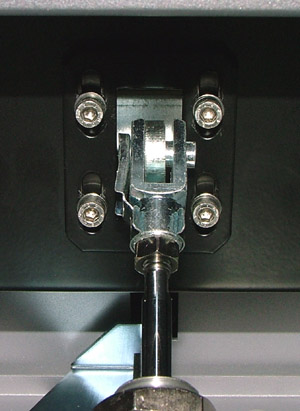
The cassette’s position inside the single-cassette autoloader is determined by the position of the cassette locker bracket. Therefore, to change the cassette’s position, it is necessary to change the cassette locker bracket’s position.


Procedure

 
  1. Fully insert the cassette trolley into the single-cassette autoloader. The trolley will lock when it is is fully inserted.
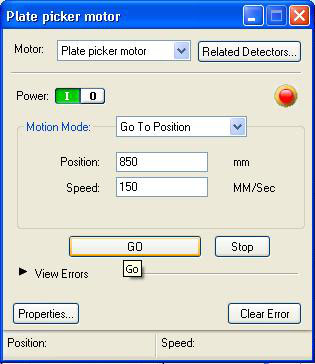
  2. In the Hardware Tree, locate the Plate picker motor dialog box, and perform the following actions:
    • In the Motion Mode list, select Go To Position.
    • In the Position box, type 850.
    • In the Speed box, type 150.
    • Click GO.


    • The plate picker moves towards the holes on the cassette tray.
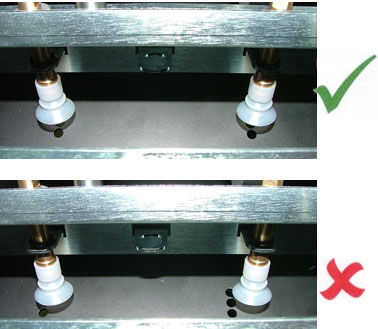
  3. Check if the plate picker suction cups fall directly over the holes on the cassette tray.


    If the suction cups and holes are not aligned, then perform the following actions:
    1. Take the cassette trolley out of the single-cassette autoloader.
      It may be necessary to manually release the cassette shutter.
    2. Adjust the position of the cassette locker bracket.


    3. Insert the cassette trolley back inside the single-cassette autoloader.
    4. Make sure the suction cups and holes are aligned.
    5. If the suction cup and holes are not aligned, repeat
      steps A-D.

Test

 
  • Load some plates.
  • Make sure the loading sequence is smooth and that the plate picker suction cups have no problems when extracting plates.

Technical contact(s)
 

Content owner: Yaron Shifman
See the Escalation page for escalation contacts.

Date submitted
 

04 Jul 2006


    Copyright © 2005 Creo Inc. All rights reserved. Confidential. Back to top.